Red Hat: What Is Red Hat and How Does It Relate to Linux?
What are Red Hat and RHEL? Linux kernel vs distribution, package managers (rpm, dnf), the Fedora, CentOS Stream and RHEL family, and the subscription model.
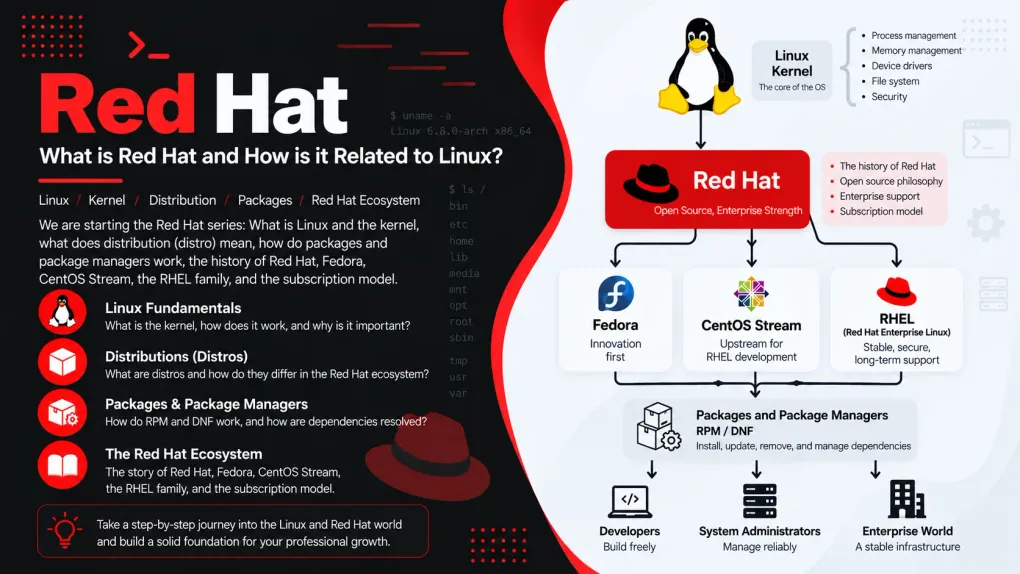
Series · Red Hat
- 1. Red Hat: What Is Red Hat and How Does It Relate to Linux?
- 2. Red Hat: Installing RHEL Step by Step
- 3. Red Hat: The Terminal and the Shell
- 4. Red Hat: The Linux File System
We are starting a new series. So far on this blog we have walked two roads. In the Algorithms series you worked out, with pen and paper, the logic of getting a computer to do a job. In the Java series we started pouring that logic into a real language, and we even went inside the JVM to see how the engine turns. Now we go one floor further down: to the ground your programs run on, the operating system. On the world’s servers, the most common form of that ground is Linux, and the best-known name for Linux in the business world is Red Hat.
In this first part we will not install anything and we will not type a single command. First, let’s sit down and answer a few questions. What exactly is Linux, and what does that thing they call the “kernel” actually do? What is a “distribution”, and why are there hundreds of them? How does a program get installed on Linux, and what is this “package manager” everyone talks about? Is “Red Hat” a company, an operating system, or both? Where did the red hat come from? Fedora, CentOS, RHEL, Rocky, Alma… what is this crowd of names? And the most curious question of all: how does a company make billions of dollars from software anyone can download for free? Remember how we wrote down brewing tea step by step in the very first Algorithms post? This time actually brew some, we are going to sit here a while.
First, the ground: what does an operating system do?
In the Java post we talked about how “dumb” a computer really is, remember? On its own it could only do tiny things: add, compare, move something from one place to another. What made it look smart was doing those tiny things billions of times per second. Let’s add one more piece to that picture.
Dozens of programs run on a computer at the same time: a browser, music, a text editor, an update check in the background… All of them want the same processor, the same memory, the same disk, the same network connection. Who gets the processor, and in what order? What happens if one program pokes into another program’s memory? When you press a key, which window does it go to? What if two programs try to write the same file on disk at once?
The big manager program that answers all of these questions, sitting between the hardware and the programs, is what we call the operating system. Think of the manager of an apartment building: the flats (programs) don’t share the water, electricity and lift (the hardware) among themselves directly; the manager sets the rules. Who uses what, and when, and who is not allowed into whose flat, is all settled. Windows is an operating system, macOS is an operating system, and so are Android and iOS on your phone. Linux is a member of this family too… but as you’ll see in a moment, the word “Linux” actually describes something a little narrower than that.
flowchart TD
    U["You (the user)"] --> A["Applications<br/>browser, editor, your Java program"]
    A --> S["Shell and system tools<br/>command line, libraries"]
    S --> K["Kernel<br/>shares out CPU, memory, disk, network"]
    K --> H["Hardware<br/>CPU, RAM, disk, network card"]
Read the diagram top to bottom. You are at the top, talking to applications. Applications never touch the hardware directly; in between sit the shell, libraries and, most importantly, the kernel. The only layer that truly talks to the hardware is the kernel at the bottom.
What exactly is this thing called “Linux”?
The short answer surprises most people: Linux is not an operating system on its own; it is the kernel of one. Just one layer of the diagram above. No shell, no installer, no browser, not even a command to list your files. The kernel is the engine that manages the hardware and offers programs services like “use the processor, take some memory, write to the disk”. That’s it.
Think of a car. The engine is the heart of the car; without it the car doesn’t move. But you can’t go anywhere with just an engine: you need a chassis, wheels, a steering wheel, seats, a dashboard. Linux is the engine. The car that emerges when you put everything around it is called a distribution, and we’ll give it a whole section of its own shortly. For now, settle this in your mind: Red Hat Enterprise Linux is a distribution, Ubuntu is a distribution, Fedora is a distribution. The same engine, the Linux kernel, runs inside all of them.
What does the kernel actually do?
We said “it manages the hardware”, but let’s open that up a little, because nearly everything we do in the later parts of this series will touch one of these five jobs.
flowchart LR
    K["Linux kernel"] --> P["Process management<br/>which program gets the CPU, when, and for how long"]
    K --> M["Memory management<br/>every program gets its own room; nobody enters anyone else's"]
    K --> D["Device drivers<br/>translators that talk to the disk, network card, keyboard, graphics card"]
    K --> F["File systems<br/>presents the raw bytes on a disk as files and folders"]
K --> N["Network stack<br/>receives and sends packets, knows who each one belongs to"]- Process management. Every running program is called a “process”. A processor can only do one thing at a time (per core); the kernel rotates processes in and out of the processor in slices of milliseconds. It does this so fast that you think they’re all running at once. The part that does this job is called the scheduler. In part 9 we’ll list and stop processes with our own hands.
- Memory management. It gives every program a memory area that is “yours only” and stops a program from reaching into anyone else’s. Remember those “boxes” in RAM from the Java post? The program doesn’t know which physical chip they actually live on; the kernel does.
- Device drivers. There are thousands of different disks, network cards, keyboards and graphics cards, and each speaks its own language. A driver is the translator who knows that language. The secret of Linux running on nearly every piece of hardware in the world is the enormous driver collection that ships inside the kernel.
- File systems. A disk is really just a pile of bytes in numbered blocks. The layer that turns “report.txt inside the Documents folder” into blocks on the disk is the kernel. The subject of parts 4 and 11.
- Network stack. Every packet going to and from the internet is handled by the kernel: whose address it is, which program it should be delivered to, the kernel knows it all. We’ll see it in part 10.
So what happens when a program wants something from the kernel? Picture a restaurant. The customer (program) can’t walk into the kitchen (hardware); they tell the waiter (kernel), the waiter goes to the kitchen and brings the food. The formal name for a program telling the kernel “read this file” or “send a packet to this address” is a system call.
flowchart TD
A["Program: "read the file report.txt""] --> L["C library (glibc)<br/>turns the request into a form the kernel understands"]
L --> SC["System call: read()<br/>crossing from user space into kernel space"]
SC --> PZ{"Is this program allowed<br/>to read this file?"}
PZ -->|"No"| ERR["Error returned: permission denied"]
PZ -->|"Yes"| FS["File system: which blocks<br/>of the disk hold the file?"]
FS --> DRV["Disk driver: read the blocks"]
DRV --> HW["Hardware: the disk"]
HW --> BACK["Data returns to the program"]The distinction between “user space” and “kernel space” in the diagram matters. The kernel works in a closed-off area, like the kitchen; programs sit out in the dining room. Whatever happens in the dining room (even a program crashing), the kitchen stays standing. This separation is one of the reasons Linux servers can run for months without a reboot. And notice that question, “is it allowed?”: the kernel answers every request by looking at who is asking. When you learn users and permissions in part 6, you’ll see how central that question is.
The story of the engine: Helsinki, 1991
The birth of Linux is one of the loveliest stories in software history. In 1991, Linus Torvalds, a 21-year-old student at the University of Helsinki, starts writing an operating system kernel to use on his own computer. In August 1991 he posts this message to an internet discussion group (lightly abridged):
“Hello everybody out there using minix. I’m doing a (free) operating system (just a hobby, won’t be big and professional like gnu)…”
“Just a hobby.” That hobby now runs the vast majority of the world’s servers, all of the 500 fastest supercomputers, the Android phone in your pocket, the modem in your home, your smart TV, and even the little helicopter that flew on Mars. Torvalds first thought of calling the kernel “Freax”; the administrator of the server he uploaded the files to named the folder “Linux”, and the name stuck.


A short timeline of Linux
You’ll see Red Hat’s own timeline shortly; first, the engine’s own journey. Not to memorise, but to get a feel for how long this has been going on.
| Year | Event |
|---|---|
| 1969 | Unix is born at Bell Labs (Ken Thompson and Dennis Ritchie) |
| 1983 | Richard Stallman announces the GNU project |
| 1987 | Andrew Tanenbaum writes Minix to teach students how operating systems work; Torvalds will be working on it in 1991 |
| 1991 | Torvalds posts his “just a hobby” message; Linux 0.01 is released |
| 1992 | Linux moves to the GPL licence: anyone can use, change and share it |
| 1993 | Debian and Slackware are founded; the oldest distributions still alive today |
| 1994 | Linux 1.0; the first release of Red Hat Linux |
| 1996 | The Tux mascot is drawn; Linux 2.0 enters multi-processor servers |
| 1998 | The term “open source” is coined; IBM and Oracle begin supporting Linux |
| 2003 | The SCO lawsuit begins (below, in the Red Hat story) |
| 2004 | The first release of Ubuntu |
| 2005 | Torvalds writes Git to manage kernel development |
| 2007 | Android is announced: the Linux kernel goes into your pocket |
| 2011 | Linux 3.0 marks the twentieth year |
| 2017 | All 500 of the world’s fastest supercomputers run Linux |
| 2021 | NASA’s Ingenuity helicopter flies on Mars running Linux |
| 2024 | The XZ backdoor (below); Linux 6.12 becomes the kernel of RHEL 10 |
The distribution (distro): the car around the engine
Now let’s come back to the car analogy and look inside the car. What does a Linux distribution put around the kernel? Knowing this list means carrying a map of the rest of the series in your pocket, because each part will open up one of these pieces.
flowchart TD
    subgraph D["The layers of a Linux distribution (bottom to top)"]
        direction TB
        DE["Desktop environment (optional): GNOME, KDE<br/>usually absent on servers"]
        APP["Applications and server software<br/>web server, database, Java..."]
        PM["Package manager + repositories<br/>rpm / dnf and the package shelves on the internet"]
        SH["Shell and core tools<br/>bash, coreutils (ls, cp, grep...)"]
        INIT["Init system: systemd<br/>brings services up in order at boot"]
        LIBC["C library: glibc<br/>the shared toolbox every program uses"]
        K["Linux kernel"]
        DE ~~~ APP ~~~ PM ~~~ SH ~~~ INIT ~~~ LIBC ~~~ K
    end
One by one, bottom to top:
- Kernel. The engine. You just met it.
- C library (glibc). The collection of ready-made functions nearly every program uses for common jobs like “open a file”, “ask for memory”, “write to the screen”. In the system call diagram, the road to the waiter went through here. In the Functions post we said “write it once, let everyone use it”; glibc is that idea at operating-system scale.
- Init system (systemd). The first program to run after the kernel when the computer boots. Like the first person up in the morning who wakes everyone else in order: it starts the network, mounts the disk partitions, brings up the web server, opens the login screen. The subject of part 8.
- Shell and core tools. The shell (bash) is the program that takes the commands you type and runs them; coreutils is the collective name for hundreds of small tools like
ls,cp,mkdir. We start in part 3. - Package manager and repositories. The infrastructure for installing and removing programs; we’ll talk about it at length shortly.
- Applications and server software. Everything you can install from the distribution’s repositories: web server, database, editors, Java, Python…
- Desktop environment. Windows, menus, icons. GNOME is the default on RHEL. But note: on a server there is usually no desktop; everything is managed from the terminal. That’s why we learn the terminal early.
On top of these, the distribution adds an installer (RHEL’s is called Anaconda; we’ll use it in part 2), default configuration decisions (which security layer is on, which file system is used), documentation and an update stream. So a distribution is more than the sum of its parts: it is a “manufacturer” that tests that the parts fit together, vouches that they work as a whole, and keeps updating them for years.
Why are distributions different from each other?
If hundreds of distributions use the same engine, where is the difference? The answer: in the decisions the factory makes. These six headings explain nearly all of the difference between any two distributions.
| Decision | What does it mean? | Examples |
|---|---|---|
| Package format and manager | What box do programs come in, and which tool installs them? | rpm/dnf (Red Hat family), deb/apt (Debian family), pacman (Arch) |
| Release model | Numbered releases, or updates that flow every day? | Point release: RHEL, Debian, Ubuntu. Rolling: Arch, openSUSE Tumbleweed |
| Support length | How many years does a release get updates? | RHEL 10 years, Ubuntu LTS 5 years, Fedora 13 months |
| Philosophy | Stability, novelty, simplicity or freedom? | RHEL stability, Fedora novelty, Debian strict free software, Arch “build it yourself” |
| Who is behind it | A company, a community, a foundation? | Red Hat (RHEL), Canonical (Ubuntu), community (Debian, Arch), foundation (Alma) |
| Defaults | Which desktop, which security layer, which file system? | GNOME, SELinux and XFS (RHEL); GNOME, AppArmor and ext4 (Ubuntu) |
Now you can see why learning one distribution makes the others feel familiar: none of the decisions in the table changes the kernel, the shell, the logic of the file system, or the user and permission system. What changes is packaging and a few defaults. Roughly ninety percent shared, ten percent “family accent”.
Families and forking
Most distributions fall into a few big families. The reason is open source’s most powerful right: forking. Because the code is open to everyone, you can take a distribution you don’t like and go your own way. Ubuntu is a fork that Canonical opened in 2004, taking Debian’s code to build a distribution that is “easier to install and releases more often”. Linux Mint is a fork of Ubuntu. CentOS, Rocky and Alma are forks of RHEL.
flowchart LR
    L["Linux kernel"] --> RH["Red Hat family<br/>rpm / dnf"]
    L --> DEB["Debian family<br/>deb / apt"]
    L --> SU["SUSE family<br/>rpm / zypper"]
    L --> AR["Arch family<br/>pacman"]
    RH --> F["Fedora"] --> RHEL["RHEL"] --> RA["Rocky / Alma"]
    DEB --> UB["Ubuntu"] --> MI["Linux Mint"]
    SU --> OS["openSUSE"]
    AR --> MA["Manjaro"]
The most visible thing that separates the families is the first row of the table: the package format. The Red Hat family uses rpm packages and the dnf tool; the Debian family uses deb packages and the apt tool. Where you’d type apt install on Ubuntu, you type dnf install on RHEL, and the rest is largely the same.
Release models: point release or rolling?
The second row of the table is the most confusing topic when choosing a distribution. There are two approaches:
flowchart LR
    subgraph S["Point release: RHEL, Debian, Ubuntu LTS"]
        direction LR
        S1["RHEL 9.0"] --> S2["9.1"] --> S3["9.2"] --> S4["..."] --> S5["RHEL 10.0<br/>(the big jump)"]
    end
    subgraph R["Rolling release: Arch, openSUSE Tumbleweed"]
        direction LR
        R1["today"] --> R2["tomorrow"] --> R3["next week"] --> R4["...<br/>no version number,<br/>small updates every day"]
    end
In the point release model the distribution ships numbered releases at set intervals; once a release is out, the major versions of the programs inside it do not change, only bug and security fixes arrive. That is what you want for a company’s server: whatever works today should work the same way after tomorrow’s update. In the rolling release model there is no version number; the newest programs flow in every day. Delightful for a curious desktop user, a nightmare for a bank’s server.
RHEL is one of the strictest examples of the point release model and has turned it into a rhythm: a major release roughly every three years (RHEL 8, 9, 10), a minor release every six months (9.4, 9.5, 9.6…), and ten years of support for every major release. Read a version number like this: 10.2 → major version 10 (which “generation”), minor version 2 (which update batch of that generation).
What is the difference between RHEL and Ubuntu?
When people say “Linux”, the first name that comes to mind for most is Ubuntu; the name you’ll run into most in the business world is RHEL. Putting the two side by side is the most concrete example of the table above, and the answer to “which one should I learn?”.
First, what they share: both use the same engine, the Linux kernel. Both have systemd, bash, GNOME, the same directory tree, the same logic of users and permissions, the same ls, cp, grep. Ninety percent of what you learn on an Ubuntu machine carries straight over to RHEL, and vice versa. The difference is in the decisions the two factories made:
| Ubuntu | RHEL | |
|---|---|---|
| Who makes it? | Canonical (2004, Mark Shuttleworth), a fork of Debian | Red Hat (1995), derived from Fedora |
| Packaging | .deb packages, apt | .rpm packages, dnf |
| Release rhythm | A release every six months; an LTS every two years (24.04, 26.04…) | A major release every three years (9, 10); a minor release every six months |
| Support length | 5 years free for LTS; 10 years and more with Ubuntu Pro | 10 years per major release; extendable for a fee |
| Cost model | Free for everyone; Ubuntu Pro if you want support | Updates tied to a subscription; free developer subscription for individuals |
| Security layer | AppArmor | SELinux (part 12) |
| Default file system | ext4 | XFS |
| Firewall tool | ufw | firewalld (part 13) |
| Container tool | Docker is common (also ships as a Snap) | Podman built in (part 14) |
| Extra package format | Snap | Flatpak |
| Administrator account | root locked; the first user administers via sudo | root enabled; plus a sudo-capable user |
| Where is it common? | Desktops, developer laptops, cloud virtual machines, WSL | Banks, telecoms, government, regulated industries, large company servers |
| Certification | Almost no official certification path | RHCSA, RHCE, RHCA |
After reading the table, separate two things. First, the difference in philosophy: Ubuntu says “for everyone, right now, for free”; RHEL says “keep it the same for ten years, have someone vouch for it, let me call someone if I need to”. Both are right; they answer different needs. Even Ubuntu’s name says as much: in Zulu and Xhosa it means “humanity, being together”. Second, the difference in commands: the differences you’ll feel day to day come down to a handful of tools. dnf instead of apt, firewalld instead of ufw, SELinux instead of AppArmor. Once you learn those in the relevant parts of this series, sitting down at an Ubuntu machine will only require thinking “what was the equivalent again?”.
The other enterprise Linuxes: SUSE, Oracle, Amazon
RHEL and Ubuntu are the two most visible faces of this market, but not the only players. In a server room you may also run into these:
| Distribution | Who, when? | Family | Notable for |
|---|---|---|---|
| SUSE Linux Enterprise (SLES) | SUSE, Germany, 1992; the oldest commercial distribution | Its own family: rpm / zypper | The standard for SAP systems; the YaST management tool; support beyond 10 years; community edition openSUSE |
| Oracle Linux | Oracle, 2006 | RHEL-compatible (built from Red Hat’s source code) | Free to download, paid support; aimed at Oracle database customers; optional kernel of its own (UEK) |
| Amazon Linux | Amazon Web Services, 2011; the Amazon Linux 2023 release is Fedora-based | Red Hat family: rpm / dnf | Only on the AWS cloud; free for AWS customers; integrated with the cloud tooling |
| Rocky Linux / AlmaLinux | Community, 2021 | RHEL-compatible | Free; paid support available from companies such as CIQ or TuxCare |
| Debian | Community, 1993 | Debian: deb / apt | The parent of Ubuntu and Pardus; no company behind it, support from third parties; very common on servers |
What they share: the same kernel, the same shell, the same command culture. What differs, again, is packaging, the support model and the organisation behind them.
There’s a hardware side, too. RHEL runs not only on the PC processors you know (x86_64) but also on the kind of ARM processors found in phones and Raspberry Pis, on IBM’s Power servers, and on the IBM Z mainframes that banks still use. The “write once, run anywhere” line from the Java post holds at the operating system level as well: the same RHEL, the same commands, completely different iron.
Upstream and downstream: the river analogy
One last concept, then on to the Red Hat story. A distribution writes none of the thousands of programs inside it itself. The kernel is developed by Torvalds’ team, bash by the GNU project, GNOME by the GNOME community, the web server by the Apache foundation. These projects are called upstream; the distribution is downstream: the plant that collects the water coming from up the river and bottles it.
This river is not one-way. When a distribution finds and fixes a bug, it sends the fix back up to the upstream project so that everyone benefits. Red Hat has a principle about this: “upstream first”. Before putting a feature into RHEL, it gets that feature accepted into the original project. That is why Red Hat is one of the largest contributors to the Linux kernel and to many foundational projects. When we get to the family tree, we’ll follow this river from Fedora all the way to RHEL.
Packages and the package manager: how do programs get installed on Linux?
In the distribution’s layers we skipped past the “package manager” with a “shortly”. Now is the time, because this concept is where newcomers to Linux feel most lost. How do you install a program on Windows? You go to a website, download setup.exe, click “Next, Next, Finish”. Every program brings its own installer; you don’t really know what it does; every program checks for its own updates separately.
The Linux world solves this from the opposite direction: like the app store on your phone. The distribution keeps thousands of programs ready on its own shelves. You say “I want this one”; the system takes the program from the shelf, adds the other pieces it needs alongside it, installs it, records it, and keeps all of it up to date with a single command. This arrangement rests on three cornerstones: package, dependency and repository.
What is a package?
A package is a box containing everything a single program (or library) needs in order to be installed. In the Red Hat family these boxes have the .rpm extension. Think of a box from IKEA: parts inside, a label saying what it is, assembly instructions, and a list saying “you’ll also need these screws”.
flowchart TD
subgraph P["httpd-2.4.62-1.el10.x86_64.rpm (inside a package)"]
direction TB
F["Files<br/>the executable program, libraries, configuration files, documentation, icons"]
MD["Metadata<br/>name, version, description, licence, size, who packaged it"]
DEP["Dependency list<br/>"these packages must also be installed for me to work""]
SCR["Scripts<br/>small jobs to run before / after installation (create a user, register the service)"]
SIG["Digital signature<br/>proof that the package really came from Red Hat"]
F ~~~ MD ~~~ DEP ~~~ SCR ~~~ SIG
endLearn to read the file name in the diagram too, because you’ll see it constantly: httpd-2.4.62-1.el10.x86_64.rpm. The pieces: httpd (the package name; this is a web server), 2.4.62 (the program’s own version), 1 (the packager’s attempt number), el10 (packaged for Enterprise Linux 10), x86_64 (which processor architecture it’s for). Even a single file name tells you that much.
Dependencies: nobody stands alone
Modern programs don’t live alone. A web server uses a separate library for encryption; that library leans on another library for compression; that one on the C library. If every program carried its own copy of these libraries, there would be hundreds of copies of the same thing on the disk, and when a vulnerability came out you’d have to fix hundreds of places. Instead, a library is installed once and everyone shares it. A program’s list of “these must be installed for me to work” is called its dependencies.
A lovely idea, but it has a trap, and that trap produced the most famous headache in Linux history.
Repositories: shelves and a catalogue
Where do the packages live? In repositories on the internet. A repository consists of two things: the package files themselves (the shelves) and a catalogue (metadata) describing which version of which package is there and what it depends on. The package manager downloads the catalogue first, then decides what to fetch from it. The same repository has copies in different parts of the world, called mirrors; you download from the one nearest you.
On RHEL the main repositories are tied to your subscription and come in two parts: BaseOS (the core pieces of the operating system) and AppStream (applications, languages, server software; some of these are offered in more than one version). Beyond those there are extra repositories such as EPEL, maintained by the community for RHEL; a program that isn’t in the main repositories can usually be found there.
Then there’s the matter of trust. How do you know that a package you downloaded from the internet really came from Red Hat, and that nobody slipped something into it along the way? Every package is signed with Red Hat’s private key; your system knows Red Hat’s public key and verifies the signature before installing any package. Like the hologram sticker in a shop: if the signature doesn’t match, the package isn’t installed. In part 7 you’ll see this with your own eyes.
Two layers: rpm and dnf
In the Red Hat family, package work is split between two tools, and mixing them up is very common.
- rpm is the low-level layer. It installs and removes a single
.rpmfile, answers questions like “which package did this file come from?”, and manages a database that records every installed package. But it doesn’t look at repositories and doesn’t download dependencies; it installs whatever you hand it. Like the warehouse clerk: puts the box on the shelf, writes it in the ledger. - dnf is the high-level layer. It searches repositories, finds the package you want, resolves the dependency chain, downloads everything, verifies signatures and has rpm do the installation. Like the purchasing manager: you say “I want this”, and it handles the rest.
Day to day you use dnf; you keep rpm mostly for queries. Let’s follow what happens behind the scenes when you say dnf install httpd:
flowchart TD
    S(["dnf install httpd"]) --> M["Read the repository catalogues<br/>(refresh if needed)"]
    M --> F{"Is httpd in a repository?"}
    F -->|"No"| E1["Error: package not found"]
    F -->|"Yes"| D["Look at httpd's dependency list"]
    D --> Q{"Any dependency left<br/>that isn't installed?"}
    Q -->|"Yes"| A["Add it to the list;<br/>look at its dependencies"]
    A --> Q
    Q -->|"No"| L["Show the list of what will be installed,<br/>ask for confirmation"]
    L --> DL["Download the packages from the nearest mirror"]
    DL --> V{"Are the signatures valid?"}
    V -->|"No"| E2["Stop: untrusted package"]
    V -->|"Yes"| I["Install with rpm,<br/>record in the database, run the scripts"]
    I --> OK(["httpd is ready"])
Note the loop in the diagram: the question “any dependency left that isn’t installed?” is asked again until the answer is “no”. This is exactly what we described in the Loops post as “a decision asked repeatedly”. For a web server this loop runs a few times; for a big desktop environment, hundreds.
Updates, and “why do the versions on RHEL look old?”
When you say dnf update, dnf compares the versions of the installed packages against the repository catalogue and downloads and installs the ones that have something newer. Simple so far. But combined with RHEL’s point release model, this produces a situation that surprises beginners: “RHEL 9 has Python 3.9, but Python 3.13 is out in the world; isn’t this system out of date?”
The answer lies in the concept of backporting. When RHEL ships a release, it freezes the major versions of the programs inside it for ten years, because the enterprise customer wants “what works today to work the same tomorrow”. But security holes and important bugs can’t wait. Red Hat’s engineers take these fixes from the program’s new version and carry them back to the old version: the version number stays 3.9, but the code inside is patched. So an old-looking version number on RHEL doesn’t mean “not updated”; it means “deliberately held steady and separately patched”. If you need a new feature from upstream, the AppStream repositories offer more than one version side by side for some languages and tools.
The other boxes: deb, Flatpak and containers
The package format changes by family, but the idea is the same: .deb packages and apt in the Debian family, rpm and zypper in SUSE, pacman in Arch. In recent years, universal formats designed to “work on every distribution” have also appeared: Flatpak (for desktop applications, backed by Fedora and Red Hat), Snap (Ubuntu’s) and AppImage (a single file, no installation). On the server side, the newest form of packaging is the container image: the program is put into a single box together with its dependencies and runs the same everywhere. We’ll do this with Podman in part 14 of the series; that’s when you’ll say “this is a package manager too, really”.
| Family | Package format | Low-level tool | High-level tool (daily use) |
|---|---|---|---|
| Red Hat (RHEL, Fedora, Rocky, Alma) | .rpm | rpm | dnf |
| Debian (Debian, Ubuntu, Mint) | .deb | dpkg | apt |
| SUSE (openSUSE, SLES) | .rpm | rpm | zypper |
| Arch (Arch, Manjaro) | .pkg.tar.zst | pacman | pacman |
| Universal (desktop) | Flatpak, Snap, AppImage | — | flatpak, snap |
| Container | image (OCI) | — | podman, docker |
The story of the red hat
Now to the company whose name this series carries. Red Hat’s story starts with two people, and at first they don’t know each other.
Marc Ewing and his grandfather’s cap
In the early 1990s, Marc Ewing is a computer science student at Carnegie Mellon University in Pittsburgh. Everyone on campus knows him, because he always wears the same cap: his grandfather’s red Cornell University lacrosse cap. Students stuck in the computer lab are told “go find the guy in the red hat, he’ll sort it out”. Ewing names his own software projects after the cap, too.
After graduating, Ewing sets out to build a Linux distribution that is easier to install and tidier than anything made so far. In the autumn of 1994, on a day that happens to be Halloween, he publishes the first release; its name is Red Hat Linux. That release is still known as the “Halloween release” today. One of the things that set Ewing’s distribution apart was the RPM package system you just met; he wrote it together with Erik Troan, and thirty years later rpm is still the cornerstone of this family.
Bob Young and the car with the hood welded shut
In the same years, a Canadian entrepreneur named Bob Young runs a small company called ACC Corporation, selling Unix and Linux software and books by catalogue. Young notices that what his customers ask for most is Ewing’s Red Hat Linux. In 1995 he buys Ewing’s business and merges it with his own, and Red Hat Software is born. Ewing runs the technical side, Young runs the business. The company settles in North Carolina, in the Raleigh area where its headquarters still are today.


Young had an analogy he told everyone back then, and I think it is still one of the best explanations of open source there is:
“Would you buy a car with the hood welded shut?”
Closed-source software is the car with the hood welded shut: you can’t look inside, only the manufacturer can repair it, and when something breaks, you wait. With open-source software the hood is open; look inside yourself if you like, or take it to another mechanic. So then what does Red Hat sell? The answer to that comes shortly, under its own heading.
Through the years
Let’s see the rest as a series of stations, then stop at the important ones one by one.
flowchart TD
    T1["1993-1994<br/>Marc Ewing builds the distribution;<br/>the Halloween release ships"] --> T2["1995<br/>Merger with Bob Young,<br/>Red Hat Software is founded"]
    T2 --> T3["1999<br/>IPO; shares soar on the first day"]
    T3 --> T4["2002-2003<br/>First Red Hat Enterprise Linux;<br/>Red Hat Linux ends, Fedora is born"]
    T4 --> T5["2004<br/>The community starts the CentOS project"]
    T5 --> T6["2006<br/>JBoss is acquired: entry into the Java world"]
    T6 --> T7["2012<br/>First open source company to reach<br/>1 billion dollars in annual revenue"]
    T7 --> T8["2014<br/>CentOS joins Red Hat"]
    T8 --> T9["2015<br/>Ansible is acquired"]
    T9 --> T10["2019<br/>IBM buys Red Hat for 34 billion dollars;<br/>new logo: just the hat"]
    T10 --> T11["2020-2021<br/>CentOS Stream takes centre stage;<br/>Rocky Linux and AlmaLinux are born"]
    T11 --> T12["2023<br/>The source code access debate"]
    T12 --> T13["2025<br/>RHEL 10 is released"]
1999: a day on Wall Street. In August 1999 Red Hat went public and its share price multiplied several times over on the first day; it was one of the biggest first-day gains to that date. For those asking “can you build a company out of software that’s given away for free?”, this was the first answer.
2002-2003: the big decision. Until then, Red Hat Linux was the same product for hobbyists and companies alike, sold in a box. In 2002 a separate, long-supported edition for companies appeared: Red Hat Enterprise Linux. In 2003, with Red Hat Linux 9, the old product was discontinued, and the community side became a separate project named Fedora. (A fedora is a style of hat; the match with the logo is no accident.) This split is the foundation of the family tree you’ll see in a moment.
2004: CentOS. RHEL’s source code was open; a group from the community took that code, stripped out Red Hat’s trademarks and compiled a free, fully compatible edition: CentOS (Community Enterprise Operating System). For years it was the darling of small companies and hobbyists as “free RHEL”. In 2014 Red Hat brought the CentOS project under its own roof.
2006 and after: the Java world. Red Hat acquired the Java application server JBoss. When you hear that Quarkus, a name that will come up often on this blog, is also a Red Hat product, you won’t be surprised any more. So these two series are closer than you’d think: you learn Java over there, and the server that Java runs on over here.
2019: IBM. In a deal announced in October 2018 and completed in July 2019, IBM bought Red Hat for 34 billion dollars, the largest software acquisition to that date. Red Hat carried on operating as a separate company inside IBM. The logo changed that same year: the shadowed face under the hat, “Shadowman”, used for years, was gone, and only the red hat remained.
2020-2021: CentOS Stream and the new clones. In December 2020 Red Hat announced it would end classic CentOS Linux and shift the focus to CentOS Stream. Stream is a continuously updated preview of the next RHEL release; not an “exact copy” of RHEL but “one step ahead” of it. The community, used to its free RHEL copy, did not like this decision, and two new projects were born in 2021: Rocky Linux, started by CentOS co-founder Gregory Kurtzer (named after the late CentOS co-founder Rocky McGaugh), and AlmaLinux, started by the company CloudLinux (“alma” means “soul” in several languages).
The family tree: from upstream to Fedora, from Fedora to RHEL
Let’s put all these names into one picture. Remember the river analogy: the water flows from top to bottom.
flowchart TD
    UP["Upstream projects<br/>Linux kernel, GNU, GNOME, systemd, Apache...<br/>(thousands of independent projects)"] --> F["Fedora<br/>community, a release every 6 months, 13 months of support<br/>newest technology; the test track"]
    F --> CS["CentOS Stream<br/>continuously updated preview of<br/>the next RHEL minor release; the prototype"]
    CS --> R["RHEL<br/>enterprise product, subscription, 10 years of support<br/>the car from the dealer"]
    R --> RA["Rocky Linux / AlmaLinux<br/>free, RHEL-compatible community distributions<br/>the same car, unbadged"]
By analogy: Fedora is a car maker’s concept cars and test track. New ideas are tried here first; exciting, but sometimes bumpy. CentOS Stream is the prototype about to enter production: nearly finished, showing what the next model will look like. RHEL is the car you buy from the dealer: tested for years, under warranty, with spare parts (updates) available for ten years. Rocky and Alma are manufacturers selling the same factory’s output under a different badge: the same car, no warranty or dealer support, but free.
This flow is concrete: every RHEL release is a specific Fedora release, frozen and polished for years. RHEL 8 derived from Fedora 28; RHEL 9 from Fedora 34; RHEL 10 from Fedora 40. A new feature you see in Fedora today turns up in RHEL two or three years later.
RHEL’s release history
You don’t need to memorise every release; but a glance at the table shows you both RHEL’s rhythm and how Linux has changed over the last twenty years.
| Release | Year | Kernel | What did it bring? |
|---|---|---|---|
| RHEL 2.1 | 2002 | 2.4 | The first enterprise release (then called Advanced Server) |
| RHEL 3 | 2003 | 2.4 | The “Red Hat Enterprise Linux” name; many processor architectures |
| RHEL 4 | 2005 | 2.6 | SELinux enabled by default for the first time (part 12) |
| RHEL 5 | 2007 | 2.6 | Built-in virtualisation (Xen) |
| RHEL 6 | 2010 | 2.6.32 | KVM virtualisation, the ext4 file system |
| RHEL 7 | 2014 | 3.10 | systemd (part 8), XFS by default, firewalld (part 13), Docker support |
| RHEL 8 | 2019 | 4.18 | dnf, AppStream repositories, Podman (part 14), the Cockpit web console |
| RHEL 9 | 2022 | 5.14 | First release derived from CentOS Stream; SSH password login for root disabled by default |
| RHEL 10 | 2025 | 6.12 | Managing the OS like a container image (image mode), an AI assistant on the command line, post-quantum cryptography, Wayland only |
So which one should I install?
flowchart LR
    Q1{"What's your goal?"} -->|"Learning, experimenting,<br/>personal projects"| A1["RHEL with the free<br/>developer subscription<br/>(what we do in this series)"]
    Q1 -->|"Company server,<br/>support required"| A2["RHEL subscription"]
    Q1 -->|"Free but<br/>RHEL-compatible server"| A3["AlmaLinux or<br/>Rocky Linux"]
    Q1 -->|"Everything newest,<br/>daily desktop"| A4["Fedora"]
    A1 --> N["Same commands and<br/>concepts on all of them"]
    A2 --> N
    A3 --> N
    A4 --> N
In this series we’ll install RHEL itself, because Red Hat gives individual developers a free subscription: you create an account, and you can download, install and update RHEL on up to 16 systems. That is exactly the subject of the next part. But if you already have an Alma or a Rocky at hand, you can follow the series without any trouble at all.
If anyone can download it for free, what does Red Hat sell?
We’ve reached the curious question from the start of the post. The source code is open, Alma and Rocky are free, Fedora is free. How does Red Hat earn billions of dollars a year?
The answer is one word: subscription. And what the subscription sells is not the software itself but the services around it. When you buy a RHEL subscription, you get:
- Tested updates. Every patch reaches you after being tried against thousands of hardware and software combinations. So your server doesn’t fall over because of an update.
- Security patches and a ten-year lifespan. When a new vulnerability is announced, Red Hat’s team prepares the fix (that backporting business), and keeps preparing fixes for ten years.
- Certified compatibility. The guarantee that “this server model, this database, this Java version has been tested on RHEL and is supported”. You can guess that a bank doesn’t settle for “seems to work”.
- A phone number. A support team that is obliged to answer when the server won’t boot at three in the morning.
- Legal assurance and tooling. A company that vouches for the licensing status of the code you run, plus extra tools for managing and monitoring systems in bulk.
Back to Bob Young’s car: Red Hat isn’t selling the car, the hood is open. What it sells is the maintenance contract, the warranty and roadside assistance. For a car you can fix at home as a hobby, you wouldn’t pay for those; but if you run a fleet of buses carrying thousands of passengers, you would. Companies pay for exactly that reason.
flowchart TD
    SRC["Open source code<br/>(Linux, GNU, thousands of upstream projects)"] --> RH["Red Hat<br/>selects, tests, patches,<br/>certifies, maintains for 10 years"]
    RH --> SUB["Subscriber (company)<br/>RHEL + updates + support"]
    SUB -->|"Something broke"| SUP{"Support line"}
    SUP -->|"Patch is prepared"| RH
    RH -->|"Improvements flow back upstream<br/>(the upstream first principle)"| SRC
Don’t miss the last arrow in the diagram: the fixes Red Hat writes don’t go only to subscribers, they flow back into the upstream projects. This loop is the heart of the model: the code stays a common good, and the company sells services on top of it.
Subscriptions come in kinds, too. The individual developer subscription this series uses is free and covers up to 16 systems; there is a free edition for teams as well. Companies buy standard and premium subscriptions, paid yearly per server and priced by support level (business hours or around the clock). The software is the same in all of them; the difference is the service that comes with it.
What happens when a vulnerability comes out? Red Hat’s difference
The “security patches” item in the subscription list looks ordinary on paper. But once you look at a few events of recent years, you understand why that item is the biggest reason companies pay for RHEL. First, let’s settle a few words.
A vulnerability is a bug in a program that lets someone malicious do something they shouldn’t be able to (read your files, take over your machine). Every serious vulnerability gets a worldwide identifier: a CVE number. You read CVE-2024-3094 as: the year 2024, record number 3094 of that year. The fix that closes the hole is called a patch. If a vulnerability leaks to the public or to attackers before its patch is ready, it’s called a zero-day: the defenders have zero days to prepare. To prevent that, the industry developed a custom: coordinated disclosure. Whoever finds the vulnerability first tells the software’s developers and the major distributors in secret; everyone prepares their patch; on the agreed day the vulnerability, the CVE and the patches are published together. That secret period is called the embargo. Red Hat classifies vulnerabilities into four severity levels (low, moderate, important, critical) and publishes every patch as a numbered security advisory (RHSA).
Why does closing a hole take so long?
You’ve probably heard this: a big vulnerability comes out, and months or even years later, systems breached through that same hole are still in the news. But careful: what takes long is usually not writing the patch; it’s the patch reaching and being applied to millions of systems around the world. There are three bottlenecks:
- The software may have no maintainer. In the open source world many critical pieces are in the hands of one or two volunteers. If there’s nobody to write the patch, or they’re late, everyone waits.
- The patch has to be carried everywhere separately. The same library is packaged separately in hundreds of distributions, thousands of products, millions of embedded devices (modems, smart TVs, cameras) and container images. Each one’s maker has to carry the patch into their own package; many never do.
- The patch may not be applied. The most common and most expensive one. In 2017 the credit company Equifax still hadn’t applied the patch for an Apache Struts vulnerability two months after it came out; attackers walked in through that hole and stole the data of 147 million people. The same year, the WannaCry ransomware locked hundreds of thousands of computers in 150 countries using a hole Microsoft had patched two months earlier; hospitals in the UK postponed operations. Years after 2021’s Log4Shell, unpatched systems are still being found.
So the time it takes to close a vulnerability is the patch being written, plus distributed, plus applied. The first two are the distributor’s job; the third is the system administrator’s. One day, that means you.
flowchart TD
    A["Vulnerability is found<br/>(researcher, engineer, sometimes an attacker)"] --> B["Private notice: upstream developers<br/>and distributors (embargo period)"]
    B --> C["Patches are prepared and tested<br/>Red Hat: backport, draft RHSA"]
    C --> D["Coordinated disclosure day:<br/>CVE and patches published together"]
    D --> E{"Patch applied?"}
    E -->|"Yes: dnf update"| F(["Hole closed"])
    E -->|"No"| G["Attackers write tools that exploit it<br/>(often within hours)"]
    G --> H["Breach: data leak, ransomware<br/>(Equifax 2017, WannaCry 2017)"]
    H --> E
Why is Red Hat’s response fast?
Red Hat has had a Product Security team doing nothing but this since 2001. That team is among the first to receive embargoed notices, because Red Hat is both the world’s largest Linux distributor and a company that employs the maintainers of critical pieces like the kernel, glibc, systemd and OpenSSL. Often the engineer who writes the patch already works at Red Hat. Red Hat is also one of the few organisations authorised to assign CVE numbers; the CVE-2024-3094 number in the XZ incident was assigned by Red Hat. The result: when coordinated disclosure day arrives, the patch is usually ready, and it arrives when you type dnf update in the morning.
A second advantage comes from the point release model you met a moment ago: because RHEL carries older, thoroughly tested versions of programs, it is often not affected at all by fresh bugs added to the newest versions. You’ll see two examples of that in the table below.
Examples from real incidents
| Incident | What happened? | Disclosed | Red Hat |
|---|---|---|---|
| Heartbleed (OpenSSL, CVE-2014-0160) | A bug in the internet’s encryption library allowed reading passwords and keys from server memory | 7 April 2014 | RHEL 6 patch the next day (RHSA-2014:0376); RHEL 5 was unaffected because it carried an older OpenSSL |
| Shellshock (bash, CVE-2014-6271) | Commands could be injected into the shell through environment variables; web servers were open to remote takeover | 24 September 2014 | Same-day patch (RHSA-2014:1293); when the first upstream fix turned out incomplete, Red Hat engineer Florian Weimer wrote the lasting fix, published within two days |
| Meltdown / Spectre (CPU, CVE-2017-5754 and CVE-2017-5715) | Flaws rooted in processor design that let programs read each other’s memory | 3 January 2018 | Same-day kernel patch (RHSA-2018:0007); Red Hat had prepared the patches during the months-long embargo |
| Log4Shell (Java Log4j, CVE-2021-44228) | Remote code execution in Java applications through a single log line; called the biggest vulnerability of the decade | 10 December 2021 | Same-day CVE page, list of affected products and temporary mitigations; product patches over the following days |
| PwnKit (polkit, CVE-2021-4034) | An ordinary user could become root through a tool found on every Linux desktop and server; unnoticed for 12 years | 25 January 2022 | Same-day RHEL 7 and 8 patches (RHSA-2022:0272 and 0274) |
| Looney Tunables (glibc, CVE-2023-4911) | A bug in the C library let a local user become root | 3 October 2023 | RHEL 8 and 9 patches within two days (RHSA-2023:5453 and 5455); glibc’s maintainers already work at Red Hat |
| XZ backdoor (xz/liblzma, CVE-2024-3094) | A backdoor planted with two years of patience in a compression library; it would have opened SSH access to servers worldwide | 29 March 2024 | Same-day alert and CVE; Fedora’s development releases were cleaned; RHEL was untouched because it carried an older xz |
| regreSSHion (OpenSSH, CVE-2024-6387) | A previously fixed hole in the remote login server reappeared | 1 July 2024 | RHEL 9 patch within two days (RHSA-2024:4312); RHEL 8 didn’t carry the affected version, so it didn’t even need a patch |
Red Hat today: not just an operating system
Red Hat’s name is tied to RHEL, but the company’s product family today is much wider. You don’t need to learn all of it now; let’s just draw a map so that when you hear the names you can say “ah, that’s Red Hat’s”.
flowchart BT
    RHEL["RHEL<br/>the operating system, the ground under everything"] --> POD["Podman<br/>containers (part 14)"]
    POD --> OCP["OpenShift<br/>managing containers across hundreds of servers<br/>(built on Kubernetes)"]
    RHEL --> ANS["Ansible<br/>the same job on hundreds<br/>of servers, one command"]
    OCP --> APP["Application side<br/>Quarkus, JBoss EAP<br/>(the world of the Java series)"]
    RHEL --> SAT["Satellite and Insights<br/>managing thousands of machines"]
    RHEL --> RAI["RHEL AI<br/>running open AI models<br/>on your own server"]
    OCP --> OAI["OpenShift AI<br/>training and serving<br/>models at scale"]
Read it bottom to top. Underneath everything is RHEL. Above it, Podman lets you put programs into portable boxes called “containers”. When you need to manage thousands of containers across hundreds of servers, OpenShift steps in. Ansible is the automation tool that does jobs like “apply this setting on those 200 servers” with a single command. Quarkus and JBoss EAP are the layer where Java applications run; you’ll meet them over in the Java series as it progresses. In this series we are at the very bottom of this stack, and we won’t climb until the ground is solid.
There’s an invisible side, too: not only Red Hat’s products but many of the pieces inside the distribution itself came out of the hands of Red Hat engineers. systemd, which you met a moment ago, was written in 2010 by Lennart Poettering and Kay Sievers while working at Red Hat. Red Hat is among the largest contributors to the GNOME desktop, the NetworkManager networking tool, the audio stack, the Linux kernel, and Kubernetes, the foundation of the container world. “Upstream first” is not just a slogan.
Red Hat and artificial intelligence
Let me open up the two new boxes on the right of the map, because this is the most talked-about side of Red Hat today. First, a bearing for the beginner: a chat assistant like ChatGPT is not a web page; behind it run thousands of servers with GPUs (graphics processors), and nearly all of those servers run Linux. Training a model means showing it billions of examples of data; inference means asking the trained model a question and getting an answer. Both happen on huge server fleets, on top of the operating system. So Red Hat’s first role in the AI world is, as always, being the ground: RHEL on GPU servers.
On top of that, from 2023 onwards, it built a product family:
| Product | What is it for? |
|---|---|
| RHEL AI (2024) | A ready-made RHEL image containing IBM’s open source Granite models, InstructLab for training the model on your own data, and a fast inference engine. The aim: run the model on your own server instead of renting it in the cloud |
| OpenShift AI (2023, formerly OpenShift Data Science) | The platform for training, versioning and serving models across hundreds of servers; the shared workspace of data scientists |
| AI Inference Server (2025) | A server that runs a trained model as fast and cheaply as possible; based on the open source vLLM project. Red Hat acquired Neural Magic, vLLM’s largest contributor, in early 2025 |
| Lightspeed assistants | AI helpers embedded in RHEL, OpenShift and Ansible: you can ask “why did the disk fill up on this server?” from the command line (RHEL 10) |
| InstructLab (2024, with IBM) | An open method and tool for adding knowledge to an AI model the way you contribute to an open source project |
Two ideas explain this whole table. First, Red Hat’s slogan: “any model, any hardware, any cloud.” Just as RHEL runs on every brand of server, it shouldn’t matter whose chip or cloud the model runs on. Second, the open source reflex you’ve met three times in this post: let the model’s weights be open (Granite), let the training method be open (InstructLab), let the inference engine be open (vLLM). A closed AI service is the 2020s version of Bob Young’s car with the hood welded shut; Red Hat is trying to open the same hood, this time for AI.
So why would a bank want this, instead of saying “we’ll just ask ChatGPT”? Because it cannot send customer data to an outside service; both the law (KVKK in Türkiye, GDPR in Europe) and common sense forbid it. If it runs the model on its own RHEL server, the data never leaves home. We’ll come back to that sentence in the final note of this post.
Where does it run?
Let’s make it concrete. The New York Stock Exchange’s trading systems run on RHEL. The world’s largest banks, airlines, telecoms, government agencies… Red Hat says the large majority of the Fortune 500 are its customers. Every major cloud provider (Amazon, Microsoft, Google) offers RHEL ready to go. Wherever you are, the back rooms of your country’s banks, telecom operators and public systems very likely hold a machine from this family. So what you’re learning isn’t a hobby tool; it’s the ground the world’s money and data infrastructure stands on.
What exactly does “enterprise” mean?
I’ve used the word “enterprise” a lot in this post; let me make it concrete, because the reason banks choose RHEL is exactly here. Three things separate an enterprise environment from an ordinary computer: scale (not a hundred machines but tens of thousands), responsibility (if the system stops, money and sometimes lives are lost) and audit (a regulator shows up and asks “how did you secure this?”).
To answer that last one, the operating system has to have been tested by independent bodies. A few of the credentials RHEL carries:
- FIPS 140-3. Its cryptographic modules have been tested against the US and Canadian government standard. Most public sector and financial institutions require this.
- Common Criteria. An international security evaluation standard; independent laboratories go through the system with a fine-tooth comb.
- DISA STIG and CIS profiles. Official configuration guides that say “this is how a secure server is set up”. RHEL ships these as ready-made profiles; with the built-in OpenSCAP tool you can check whether a system complies with the guide in a single command.
- Industry rules such as PCI DSS. Rules every system that handles credit cards has to follow; RHEL’s profiles have ready answers for these, too.
Then there’s the certified catalogue: which server model, which database, which SAP or Oracle version is officially supported on RHEL, all in one list. A bank doesn’t say “seems to work”; it says “it’s on the list”. What justifies the price of enterprise Linux is less the software itself than this pile of paper.
A short look inside the system: what lies ahead?
Before closing the post, let me introduce, in a sentence each, three concepts we’ll open up at length in later parts, so that what you see on the installation screen in part 2 doesn’t feel foreign.
The boot chain. What happens when you press the power button is like a relay race:
flowchart TD
    B["1. UEFI / BIOS: the motherboard's firmware finds the disk"] --> G["2. GRUB: the bootloader, which kernel to load?"]
    G --> K["3. Linux kernel: recognises the hardware"]
    K --> S["4. systemd: starts services in order"]
    S --> LG["5. Login screen or command line"]
The motherboard’s own tiny firmware (UEFI) finds the disk and runs the bootloader (GRUB); GRUB loads the kernel into memory; the kernel recognises the hardware and starts the first program, systemd; and systemd brings everything up in order. In part 8 we’ll touch every link of this chain.
Terminal, shell and command. The three are often confused. The terminal is the window that shows what you type; the shell is the program that reads the line you typed in that window and runs it (bash on RHEL); a command is a single job you tell the shell (like ls). The window, the waiter, the order. We start in part 3.
root and the ordinary user. Linux has a single account that can do everything: root. Everyone else can only touch their own files; for system files they ask root for permission (with the sudo command). The “is it allowed?” question in the system call diagram is fed from here. The subject of part 6.
The certification path: RHCSA, RHCE and beyond
I said I’m writing the series “following the RHCSA syllabus”; let me explain what that is in two paragraphs. RHCSA (Red Hat Certified System Administrator) is Red Hat’s entry-level system administration certification. What sets the exam apart from most other IT exams is this: there are no multiple-choice questions. You are put in front of a real RHEL machine and given concrete tasks such as “create this user, mount this disk, start this service at boot, configure SELinux like so”. If you can do it, you pass; if you can’t, you don’t. So it can’t be passed by memorising, and rightly so.
One step up is RHCE (Red Hat Certified Engineer), built around automation with Ansible. Above that is RHCA (Architect), reached by collecting specialist exams. This series covers the RHCSA topics in order; in the final part we’ll talk about the exam itself, how to prepare, and which roads open up afterwards.
The series roadmap
I want you to know where we’re going from the start. Each part builds on the one before, just like in the other series:
- What is Red Hat? The post you’re reading now.
- Installing RHEL. The free developer subscription, a virtual machine, installation step by step.
- The terminal and the shell. First commands; meeting bash.
- The Linux file system. “Everything is a file” and the directory tree.
- Redirection, pipes and vim. Chaining commands together, editing files.
- Users and permissions. root, sudo, rwx.
- Packages: RPM and dnf. Applying the concepts from this post on a real machine.
- Services with systemd. The boot chain, managing services.
- Processes and scheduling. Running programs, logs, cron.
- Networking and SSH. Connecting to a machine remotely.
- Disks and LVM. Managing storage.
- SELinux. Understanding it without fear.
- firewalld. The firewall.
- Containers with Podman. Putting a program in a box.
- Final steps and the RHCSA path.
The up-to-date list, with the published parts, always lives on the Red Hat page.
Think for yourself
We didn’t type any commands in this part, so the questions are on paper too. The aim is to see whether the concepts have settled in.
Question 1 — Is there Linux in your phone? (easy)
We said Android phones use the Linux kernel. Does that make it correct to say “Android is a Linux distribution”? Think with the car analogy.
Question 2 — Put them on the right shelf (easy)
Match these four names with their descriptions: Fedora, CentOS Stream, RHEL, AlmaLinux. (a) The enterprise product, supported for ten years and sold by subscription. (b) A preview of the next RHEL release. (c) The community distribution that ships every six months and tries new technology first. (d) A free, RHEL-compatible community distribution.
Question 3 — The dependency chain (medium)
The
photoeditorpackage you want to install depends onimagelib, andimagelibdepends oncompression;compressionis already installed. When you saydnf install photoeditor, which packages does dnf download? Follow the loop in the flowchart by hand.
Question 4 — The old-looking version (medium)
A friend says “RHEL 9 has Python 3.9, it’s out of date, this system is insecure.” Write them a two-sentence reply using the concept of backporting.
Question 5 — The car with the open hood (medium)
A friend says “If the code is open anyway, paying Red Hat is nonsense, everyone just installs Alma and moves on.” Explain to them, in one paragraph, when they’re right and when they’re wrong.
Question 6 — Do commands travel? (medium)
You need to guess whether a command you learned on RHEL will also work on Ubuntu. Which kinds of commands do you think are the same on both sides, and which differ? Look at the “RHEL versus Ubuntu” table.
Question 7 — The patch existed (medium)
In the Equifax incident, the patch for the Apache Struts vulnerability came out in March 2017; the company was breached in May. In which box of the security flowchart did this company get stuck? What does this have to do with a system administrator?
A final note: underneath everything is data
Before closing this post, let me say in one word why this whole story of kernels, packages and subscriptions matters: data.
The most valuable thing of the twentieth century was oil; countries fought wars for it. The oil of the twenty-first century is data, and that is no longer a metaphor. Your account numbers, your health records, your location, your messages, your habits, your face and your voice… all of it sits on a server, and the great majority of those servers run Linux. What happens when your data is stolen is no longer limited to “I’ll change my password”: loans can be taken out in your name, your voice and face can be imitated with AI to defraud your family, a company’s entire data can be encrypted and held for ransom, a hospital can shut down for days. In 2016 a database containing the identity details of roughly 50 million citizens of Türkiye ended up on the internet; that data is still in circulation. AI enlarges this picture from two directions: models are fed with data (yours included), and the list of things that can be done with stolen data grows longer every year.
That is why a system administrator’s real job is not keeping the server up but protecting the data. Every part of this series actually serves that: users and permissions (who can touch what), SELinux (even when a rule is broken, the kernel says “stop”), the firewall (who can get in), updates (closing known holes), disk encryption and backups. You’ll learn commands, but let this question stand behind every command: does this change whose hands the data is in?
Red Hat’s work in this area can be summed up in three layers as well:
- Locks at the kernel level. Red Hat is the main maintainer of SELinux, on by default in RHEL since 2005. The maintainer of Linux’s disk encryption tool (LUKS) is a Red Hat engineer; the Clevis/Tang method, which unlocks an encrypted server disk at boot using a key server on the network, was born at Red Hat.
- System-wide encryption rules. Since RHEL 8, a single command switches the whole system into “reject weak encryption” mode; FIPS-validated modules; and with RHEL 10, post-quantum cryptography, that is, preparing today for the possibility that future quantum computers break today’s ciphers.
- Identity, detection and the supply chain. Identity Management for the organisation and Keycloak for applications (born at Red Hat, handed to an independent foundation in 2023); Insights to detect vulnerabilities before you notice them; software supply chain assurance (signed builds, a bill of materials for every package), which grew in importance after the XZ incident; containers running without root (Podman); and work on confidential computing, where data stays encrypted even while in memory.
Let’s close the AI link, too: an organisation cannot send customer data to an outside chat service; KVKK and GDPR already forbid it. The solution is to run the model on your own server. The reason RHEL AI and OpenShift AI exist is exactly this sentence: the data never leaves home.
Summary and what’s next
Sources and further reading
The sources behind this post, and the official pages to turn to for the next step:
- Red Hat Developer Subscription: to download RHEL for free (the subject of part 2).
- RHEL life cycle: support dates for every release.
- Red Hat security updates and CVE database: the official records of the incidents in this post, for example CVE-2024-3094 (the XZ backdoor).
- Fedora, CentOS Stream, Rocky Linux, AlmaLinux: the distributions in the family tree.
- Pardus: TÜBİTAK’s distribution.
- kernel.org: the home of the Linux kernel; History of Linux (Wikipedia).
- Red Hat AI, InstructLab, vLLM: the projects from the AI section.
- RHCSA certification: the exam’s official page.
- Photos, Wikimedia Commons: Linus Torvalds, Richard Stallman, Tux, Bob Young, Red Hat Tower.
.jpg)


Related posts
Frequently asked questions
What is Red Hat?
Red Hat is a software company founded in 1993 and headquartered in Raleigh, North Carolina, in the United States. Its best-known product is Red Hat Enterprise Linux (RHEL), the operating system that companies run on their servers. Every one of its products is open source; the company makes money not by selling software but by selling subscriptions that bundle support, updates and guarantees. It has been part of IBM since 2019 but continues to operate as a separate company.
Where does the name Red Hat come from?
Founder Marc Ewing wore his grandfather's red Cornell lacrosse cap during his university years. In the computer lab, people who needed help were told to "look for the guy in the red hat". Ewing named his own software projects after the cap, and the Linux distribution he released in 1994 became Red Hat Linux. The company's current logo is simply that red hat.
What is the difference between Linux and Red Hat?
Strictly speaking, Linux is only the name of the kernel, the heart of the operating system, which Linus Torvalds started in 1991. You cannot use a computer with a bare kernel; you also need a command line, an installer, a package manager and thousands of tools. The thing that gathers all of that into a tested bundle is called a distribution. Red Hat Enterprise Linux, Ubuntu, Fedora and Debian are distributions; Linux is the kernel they all share.
What is a Linux distribution (distro), and why are there so many?
A distribution is the product that takes the Linux kernel and adds a shell, core tools, a C library, an init system, a package manager, repositories, an installer and an optional desktop, then tests it all as an installable whole. Because the kernel and the tools are all open source, anyone can assemble their own combination; copying and modifying a distribution is called forking. Ubuntu forked from Debian, Linux Mint from Ubuntu, CentOS and Rocky Linux from RHEL. Different needs (stability, novelty, simplicity, enterprise support) produce different distributions, but most commands and concepts are shared by all of them.
What is a package manager? What is the difference between rpm and dnf?
A package is a box holding a program's files, its version and dependency information, its install scripts and a digital signature; in the Red Hat family these boxes have the .rpm extension. A package manager is the tool that downloads these boxes from repositories on the internet and installs, updates and removes them. rpm is the low-level layer: it installs and queries a single package file and maintains the database of installed packages, but it does not find or download dependencies. dnf is the high-level layer: it searches repositories, resolves dependencies, downloads packages, verifies signatures and hands the installation to rpm. Day to day you use dnf; rpm is mostly kept for queries.
What is the difference between RHEL and Ubuntu?
Both are distributions built on the Linux kernel, systemd, bash and GNOME; the file system layout, users and permissions, and most commands are the same. The differences are factory decisions. Ubuntu is Canonical's distribution derived from Debian: deb packages and apt, a release every six months and an LTS every two years with five years of support, free updates for everyone, AppArmor as the security layer; it is very common on desktops and cloud virtual machines. RHEL is Red Hat's enterprise product: rpm packages and dnf, a major release every three years with ten years of support, updates tied to a subscription (free for individual developers), SELinux, certified hardware and software compatibility; it dominates in banks, telecoms and government. Someone who learns one adjusts to the other in a few days.
What is Pardus, and is it related to RHEL?
Pardus is the Linux distribution developed by TÜBİTAK, Türkiye's national research council; first released in 2005, it has been based on Debian since 2013 and uses the apt package manager. It is used in government agencies, courts and schools in Türkiye. It has no direct link to RHEL; it belongs to the Debian family, not the Red Hat family. But since both use the same Linux kernel, systemd and bash, most of what you learn in this series also applies on Pardus; the difference is the package manager and a few defaults.
Is RHEL free? How can I use it for free?
RHEL's source code is open, but Red Hat delivers the ready-made system through a subscription. There is, however, a free "Red Hat Developer Subscription for Individuals": create an account at developers.redhat.com and you can install and update RHEL on up to 16 systems at no cost. That is plenty for learning, experimenting and personal projects, and it is what we will use throughout this series.
What is the difference between Fedora, CentOS Stream and RHEL?
They are three links in the same chain. Fedora is the community-driven distribution that ships a new release roughly every six months and is the first to try new technology. CentOS Stream is a continuously updated preview of the next RHEL release; new things pass through it before landing in RHEL. RHEL is Red Hat's enterprise product: tested for years, supported for a decade, delivered by subscription. Every RHEL release derives from a specific Fedora release; RHEL 10 comes from Fedora 40, RHEL 9 from Fedora 34.
What are Rocky Linux and AlmaLinux?
Both are free, community-run distributions compatible with RHEL. They were founded in 2021 to fill the gap left when Red Hat ended classic CentOS Linux in favour of CentOS Stream. Rocky Linux was started by CentOS co-founder Gregory Kurtzer and named after the late CentOS co-founder Rocky McGaugh. AlmaLinux was started by the company CloudLinux and is now run by a foundation. Every command you learn for RHEL works the same way on both.
How does Red Hat make money from open source software?
By selling subscriptions rather than software. A RHEL subscription covers tested updates, security patches, certified hardware and software compatibility, a ten-year support lifecycle and a support team you can call when something breaks. Co-founder Bob Young used to put it this way: "Would you buy a car with the hood welded shut?" Open code means the customer can open the hood; the money goes to maintenance, warranty and roadside assistance.
How quickly does Red Hat patch security vulnerabilities?
Red Hat has had a dedicated Product Security team since 2001 and is among the first to receive embargoed advance notice of major vulnerabilities; often the engineers who write the fix already work at Red Hat. That is why RHEL patches for Heartbleed (2014), Shellshock (2014), Meltdown and Spectre (2018) and PwnKit (2022) were published on the same day as the disclosure or the day after. Thanks to the point release model, RHEL is sometimes not affected at all: in the 2024 XZ backdoor and the regreSSHion flaw, RHEL's older, well-tested versions did not contain the problematic code. Still, a patch only helps if it is applied, and that is the system administrator's responsibility.
What is Red Hat doing in artificial intelligence?
AI models run on GPU servers, and nearly all of those servers run Linux; Red Hat's first role is providing that ground. On top of it sits a product family: RHEL AI, a ready-made RHEL image that lets you run open source models (IBM's Granite models) on your own server and train them on your own data with InstructLab; OpenShift AI, the platform for training and serving models across hundreds of servers; AI Inference Server, a vLLM-based server that runs models fast and cheaply (Red Hat acquired Neural Magic, the largest contributor to vLLM, in 2025); and the Lightspeed assistants, AI helpers built into RHEL, OpenShift and Ansible that you can ask for help from the command line. Its approach is "any model, any hardware, any cloud", and running the model on the organisation's own servers so that the data never leaves.
What does Red Hat offer for data security?
Three layers. At the kernel level: SELinux (the kernel stops an action even if rules are broken; Red Hat is its main maintainer and it has been on by default since 2005), LUKS disk encryption, and Clevis/Tang, which unlocks an encrypted disk at boot using a key server on the network. System-wide: crypto policies that reject weak encryption with a single command, FIPS-validated modules, and post-quantum cryptography with RHEL 10. On the identity and process side: access control with Identity Management and Keycloak, proactive detection of vulnerabilities with Insights, software supply chain assurance with signed builds and bills of materials, rootless Podman containers, and work on confidential computing. The goal is the same throughout: the data stays in the organisation's hands.
What is RHCSA, and does this series prepare me for it?
RHCSA (Red Hat Certified System Administrator) is Red Hat's entry-level system administration certification, earned through a hands-on exam where you perform real tasks on a real system; there are no multiple-choice questions. This series covers the RHCSA syllabus topics (file system, users, permissions, packages, systemd, networking, storage, SELinux, containers) in order, written for a complete beginner. The goal is not to memorise exam questions but to truly understand the topics; by the end of the series you will have a solid foundation for the exam.