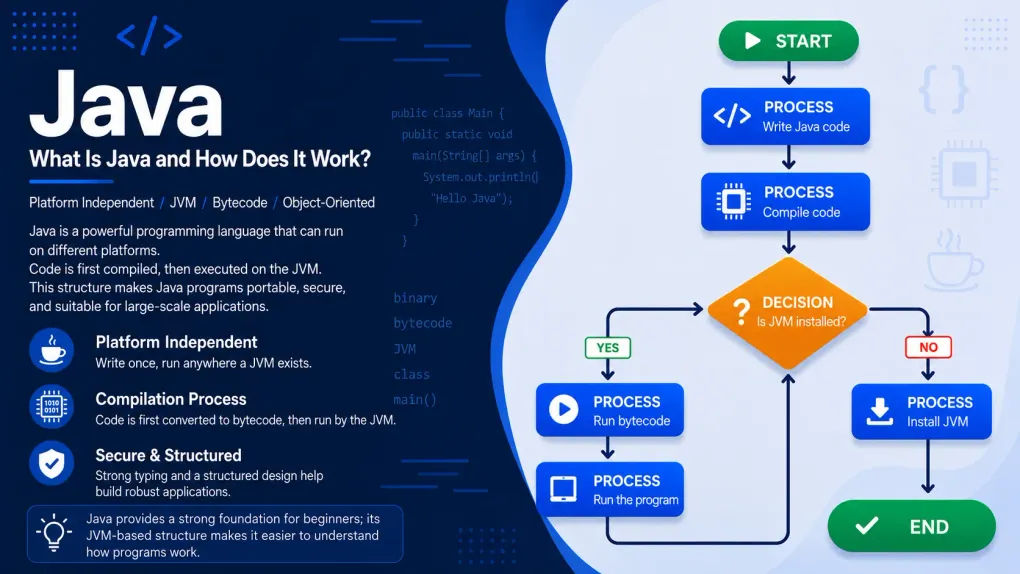
Java: What Is Java and How Does It Work?
Starting Java from scratch: what is Java for, who made it? How does a program run, what are binary and bytecode, which layers live inside the JVM, and how do JIT and the garbage collector work?
Series · Java
- 1. Java: What Is Java and How Does It Work?
- 2. Java: A Journey into the Depths of the JVM
- 3. Java: Installing the JDK and Your First Hello, World!
We’re starting a new series. If you followed the Algorithms series, you figured out how a computer “thinks” with pen and paper: variables, conditionals, loops, lists, functions. Now it’s time to pour those thoughts into a real language. And that language will be Java.
But we won’t rush. Before writing Java’s first line, I want the answers to these questions: what exactly is Java for? Where did it come from, who made it, why? How does a computer program actually run? What are those 0s and 1s they call “binary”? What does bytecode look like? Which layers live inside Java’s beating heart, the JVM, and what do JIT and the garbage collector do? This post is going to be long, because we’ll go through all of it one piece at a time. If you’re ready, let’s begin.
What exactly is Java for?
Think of it this way: Java is one of the languages we use to tell a computer what to do. You write it a list of instructions (that is, a program), and it turns that into something the computer can understand and run. So it’s a kind of “middleman language.” But why is it so famous, and where do we run into it?
You’ve probably touched dozens of things written in Java today without even realizing it:
- Android phones. For many years, most Android apps were written in Java. There’s Java under a lot of the apps in your pocket.
- Banks and big companies. Behind the scenes of the world’s largest banks, insurance companies, and airline booking systems, Java is often what’s running. It’s known for being solid and reliable; that’s why it’s so loved in places that can’t afford mistakes, like “money matters.”
- Enormous websites. Important parts of systems that serve millions of people, like Netflix, LinkedIn, and Amazon, are written in Java (and its relatives).
- Games. The original version of Minecraft, the best-selling game in the world, was written in Java. (That’s why it’s called the “Java Edition.”)
- Embedded systems, IoT, and palm-sized devices. Perhaps the most surprising part: Java runs not only on giant servers but also on tiny devices that fit in your hand. You can comfortably run Java on a Raspberry Pi, a cheap, credit-card-sized computer. Even more striking: the tiny chip inside your phone’s SIM card and many bank cards runs a version of Java called “Java Card”; that means billions of cards are quietly running Java. ATMs, smart meters, industrial sensors, old Blu-ray players… Java is inside a lot of them.
That this breadth is no accident you’ll see in a moment: the team that created Java designed it precisely for small devices (things like televisions and remote controls). Over the years Java first became the language of huge systems, but then it also realized its original dream and returned to those tiny devices. So how can one and the same language run both on a giant bank’s server and on a Raspberry Pi in your palm?
flowchart TD
    BC["One single bytecode<br/>(the program you wrote once)"] --> S1["Giant bank server"]
    BC --> S2["Android phone (ARM)"]
    BC --> S3["Raspberry Pi (ARM)"]
    BC --> S4["SIM / bank card chip<br/>(Java Card)"]
The answer is hidden in the bytecode + JVM duo you’ll meet shortly in this post: you write the program once, and each device’s own JVM (whether it’s a powerful server processor, or a phone’s or Raspberry Pi’s ARM processor) translates it into that device’s language. So when we say “runs anywhere,” we really mean anywhere: from the biggest to the smallest.
In short, Java made a name for itself as the language of both “big, serious work” and “tiny devices.” It has a history of more than thirty years, yet it’s still among the most in-demand, most used languages.
First let’s settle this: how does a computer actually work?
To understand how Java works, we need to go down one floor. Because the very reason Java exists is hidden down on that lower floor.
The secret is surprisingly simple: a computer is actually pretty dumb. Sounds odd, I know. But the truth is that on its own, a computer can only do very small, very simple things: add two numbers, compare two values, take a piece of information from one place and put it in another. That’s it. The thing that makes it look “smart” is that it does these tiny jobs at an incredible speed, billions of times a second.
Inside a computer there are, roughly, two important parts. One is the processor (CPU): the computer’s “brain” that does all those simple jobs. The other is the memory (RAM): where it temporarily holds information while it works. Remember the “labeled box” example from the variables post? Those boxes physically live right here, in memory.
So what language does this processor speak? That’s the key question.
Binary: the computer’s only real language
At the deepest level of a computer, everything happens with electricity. And for electricity, there’s only one question that matters: is there a current or not? Like whether a lightbulb is on or off. The computer boils the whole world down to this single question.
We represent the “current on” state with 1 and the “current off” state with 0. A system made only of these two digits, 0 and 1, is called binary. We call each of these individual 0s and 1s a bit. A bit is the smallest piece of information in a computer.
A single bit isn’t much use on its own (it can only say “yes or no”). But line them up and things change. When we bring eight bits together we get a byte, and with one byte we can already express 256 different things. (Keep this word “byte” in mind; it’ll show up again soon in “bytecode.”)
But how is this calculated? (and why do we count in tens?)
I just said the letter “A” is 65, and 65 is 01000001 in binary. But where do we get that 01000001 from? To understand it, let’s ask a question you’ve probably never asked in your life: why do we humans use exactly ten digits, 0 through 9?
The answer is literally at your fingertips: we have ten fingers. Early humans started counting on their fingers, and our number system naturally settled on ten. So much so that the English word digit, meaning a numeral, comes from the Latin digitus, meaning finger.
But this isn’t a universal law, just a habit. Throughout history different civilizations used completely different bases, and some are still in our lives today:
- The Babylonians counted in base 60. The fact that an hour has 60 minutes, a minute has 60 seconds, and a circle is divided into 360 degrees is a direct inheritance from them. So every time you look at a clock, you’re using a 4000-year-old number system.
- The Maya used base 20; most likely counting both fingers and toes.
So how does “base 10” actually work? It’s something you do all the time without ever stopping to think. Take the number 365. It means:
365 = (3 × 100) + (6 × 10) + (5 × 1)
Each digit has a weight, and these weights, from right to left, are the powers of 10: ones (1), tens (10), hundreds (100), thousands (1000)… Why 10? Because we have 10 digits. That’s what “base 10” is: ten digits, and each place is ten times the one to its right.
Now the neat part. A computer has no fingers; it has only two states: current on (1), current off (0). So it has only two digits to work with. It counts place by place just like us, but instead of powers of 10 it uses powers of 2. The weights of a byte (eight places), from right to left, go like this, each one twice the previous:
| Place weight | 128 | 64 | 32 | 16 | 8 | 4 | 2 | 1 |
|---|
Reading binary is now easy: wherever there’s a 1, add up that place’s weight. Let’s drop 01000001 into this table:
| Weight | 128 | 64 | 32 | 16 | 8 | 4 | 2 | 1 |
|---|---|---|---|---|---|---|---|---|
| Bit | 0 | 1 | 0 | 0 | 0 | 0 | 0 | 1 |
The places with a 1 are 64 and 1. Add them: 64 + 1 = 65. So the decimal value of 01000001 is 65; the number for the letter “A.”
The reverse works too: turning a number into binary. Say we want 65 in binary. Start from the biggest weight and ask “does it fit?”:
- 128 → does it fit in 65? No (128 > 65). Digit: 0.
- 64 → does it fit? Yes. Take one; 65 − 64 = 1 is left. Digit: 1.
- 32, 16, 8, 4, 2 → none of them fit in the remaining 1. Digits: 0 0 0 0 0.
- 1 → does it fit? Yes, exactly; 0 is left, done. Digit: 1.
Lining up the bits in order: 01000001. One more with the same method: the number 13 = 8 + 4 + 1, which is 00001101 in binary. No magic at all; just the question “which powers of 2 add up to this number?” (If you want to try one more, the letter “B” is waiting: 66 = 64 + 2.)
The commands the processor directly understands and runs are also in this 0-1 language. This lowest-level language is called machine code (or machine language). The processor understands nothing else; whatever you want it to do, it eventually has to be translated into this 0-1 language.
So why don’t we just write 0s and 1s?
Now think about it. You’re going to write a program. If you had to do it by writing pure 0s and 1s, even the simplest job would turn into a nightmare. Even a tiny request like “print Hello to the screen” would be pages upon pages of 0s and 1s. A human can’t write something like that, can’t read it, and certainly can’t find and fix a bug in it.
The solution? We humans write in a language that reads well to us; then a translator converts it into the machine code the computer understands. That’s exactly what languages like Java (and the real programming languages we imitated earlier with pseudocode) are for: a middle ground between human and machine.
flowchart LR
    A["The code you write<br/>(a language humans can read)"] -->|"translator"| B["Machine code<br/>0s and 1s"]
    B --> C["Processor (CPU)<br/>runs the commands"]
There are two classic ways to do this translation, and knowing the difference is the key to understanding Java.
Where did Java come from? A short but nice story
Before the technical part, let me tell you where Java came from; because you understand why Java was designed the way it is much better once you know the story.
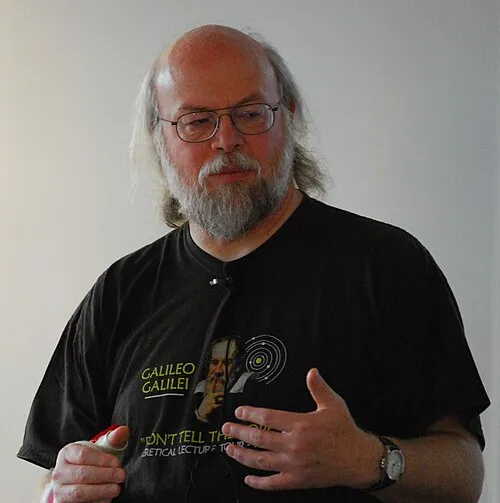
The year is 1991. At a computer company called Sun Microsystems, a small team gathers. They call themselves the “Green Team.” At the core of the team were three names: James Gosling, who designed the language, and Patrick Naughton and Mike Sheridan, who kick-started the project. (Other engineers joined over time, but these were the founding trio of the “Green Team.”) Their goal wasn’t actually to write computer programs like today; they wanted to develop a language for consumer electronics devices like smart televisions and remote controls.
But they hit a problem. The processor inside every device was different, meaning each one’s machine code was different. A program written for one device wouldn’t run on another; it had to be rewritten for each device. The Green Team asked: “Can’t we make a language you write once that can run on every device?” Java’s whole spirit was born from that question.
Java was officially announced to the world in 1995 and quickly drew a lot of interest. In those years the internet was just spreading, and the idea of “write once, run anywhere” fit the moment perfectly. Over the years, Java went far beyond the consumer-electronics idea and became the language of enormous systems. Java also has a cute, red-nosed mascot named Duke, still the community’s symbol. (Sun was bought by Oracle in 2010; Java continues to evolve today under Oracle’s roof.)
How does Java work? Bytecode and that stopover
Now let’s put all the pieces together. Remember the problem the Green Team wanted to solve: a program should be written once and run on every device. But every device’s machine code was different. How did they solve it?
With a trick like this: they didn’t translate Java code directly into a device’s machine code. They put a stopover in between.
- You write Java code. This is a file you can read, with a
.javaextension (for exampleHello.java). - A compiler called
javactranslates this code not into machine code but into an intermediate language called bytecode. Out comes a file with a.classextension. Bytecode is not yet specific to any device; it’s a halfway language. - The JVM (Java Virtual Machine) steps in. Every device has its own JVM. The JVM takes the bytecode and translates it into the machine code of the device it’s currently running on, then runs it.
flowchart TD
    A["Hello.java<br/>(the source code you wrote)"] -->|"compiled with javac"| B["Hello.class<br/>(bytecode — the halfway language)"]
    B --> C{"Which device<br/>will it run on?"}
    C -->|"Windows' JVM"| D["Windows machine code<br/>→ runs"]
    C -->|"Mac's JVM"| E["Mac machine code<br/>→ runs"]
    C -->|"Linux's JVM"| F["Linux machine code<br/>→ runs"]
See the cleverness? You write Hello.java once, javac turns it into bytecode once. Then that same bytecode can run on Windows, Mac, and Linux. “Write once, run anywhere” is exactly this.
One second: why is this so important? (let’s compare with C)
To see how clever this “stopover” idea is, let’s look at the world before Java. Take C, a language older than Java. In C, the code you write is compiled directly into that device’s machine code. So you have to compile separately for Windows, separately for Mac, separately for Linux (and often tweak the code a bit too). Three operating systems means three separate compilations and three separate runnable files:
flowchart TB
    subgraph C["Classic languages like C: a separate path per platform"]
        direction TB
        CS["code.c"] --> CW["Windows compiler<br/>→ Windows.exe"]
        CS --> CM["Mac compiler<br/>→ Mac program"]
        CS --> CD["Linux compiler<br/>→ Linux program"]
    end
    subgraph J["Java: compile once, leave it to the JVM"]
        direction TB
        JS["Hello.java"] --> JB["javac<br/>→ Hello.class (one bytecode)"]
        JB --> JW["Windows JVM"]
        JB --> JM["Mac JVM"]
        JB --> JL["Linux JVM"]
    end
See the difference? In C there’s a separate path for each platform starting from the source code. In Java the hard part (translating source into bytecode) is done once; the only difference between platforms is the JVM at the very end. So Java takes the “different device” worry out of your code and buries it inside the JVM. You produce a single bytecode, and each device’s own JVM handles the rest. That’s exactly the engineering behind Java’s famous slogan, “write once, run anywhere.”
But what does bytecode actually look like?
We’ve been saying “bytecode” without stopping, but you’re probably curious: what exactly is this intermediate language? Let’s open the hood and look.
Bytecode is made of commands written not for a real processor but for an imaginary computer (the JVM). This imaginary computer works like a “stack machine”: while doing its work it piles values on top of one another like a stack of plates, then takes the top ones off and processes them. Each command fits into a single byte (a number from 0 to 255); that’s where the name “byte-code” comes from. There are about 200 different commands in total.
Let’s see a concrete example. Say you wrote a line in Java that adds two numbers and stores the result in a third (c = a + b). javac turns it into bytecode commands like these:
iload_1 # push the value of a onto the top of the stackiload_2 # push the value of b onto the top of the stackiadd # take the top two values, add them, push the resultistore_3 # take the result off and store it in cLet’s trace how the stack changes at each step (say a = 5, b = 3); just like the trace table from the Algorithms series:
iload_1 → stack: [5]iload_2 → stack: [5, 3]iadd → stack: [8] (5 and 3 taken off, 8 put on)istore_3 → stack: [] (8 taken off and written to c → c = 8)Notice: your one-line c = a + b was split into four tiny commands. That’s exactly what the processor likes: very simple, very small steps. Likewise, System.out.println("Hello") roughly turns into: push the object representing the screen onto the stack, then push the "Hello" text, then call the “print” command. Remember calling a function? At the bytecode level, a function call looks just like this.
Inside the JVM: layer by layer
Now we’ve reached the most crucial part. We said “the JVM runs bytecode,” but the JVM isn’t a single box; inside it are three big subsystems working together. Picture the journey of a bytecode file (that is, your program) through the JVM with this diagram:
flowchart TB
    SRC["Hello.class (bytecode)"] --> CL
    subgraph JVM["JVM — Java Virtual Machine"]
        direction TB
        CL["1) ClassLoader<br/>Load → Link → Initialize"]
        RDA["2) Runtime Data Areas<br/>Method Area · Heap · Stack · PC · Native Stack"]
        EE["3) Execution Engine<br/>Interpreter + JIT + Garbage Collector"]
        CL --> RDA --> EE
    end
    EE --> CPU["Processor (CPU)<br/>machine code → runs"]
Let’s open up these three layers one by one.
1. ClassLoader: the door that lets classes in
Before your program starts running, its bytecode (the .class files) needs to be brought into memory. The ClassLoader does this job. It works in three stages:
- Loading: it finds the
.classfile and reads the bytecode inside into memory. Several loaders do this: the most basic Bootstrap (loads Java’s own core classes), above it the Platform, and on the outside the Application (which loads the classes you wrote). - Linking: it has three small steps. Verify — checks whether the bytecode is safe and follows the rules (a corrupt or malicious file can’t get past here; part of Java’s security). Prepare — allocates memory for the class’s variables. Resolve — connects the references one part makes to another into real addresses.
- Initialization: the class’s starting values are assigned and setup code runs. The class is now ready to use.
There’s a nice rule in how these loaders work: “ask upward first” (called parent delegation). The Application loader, which will load your class, doesn’t jump in right away; it first asks the Platform above it, which asks the Bootstrap above it, “can you load this?” If nobody up top can, the job comes back down to the Application at the bottom.
flowchart TD
    A["A class is to be loaded"] --> AP["Application loader<br/>'let me ask upward first'"]
    AP --> PL["Platform loader<br/>'let me ask upward first'"]
    PL --> BS["Bootstrap loader<br/>(Java's core classes)"]
    BS -.->|"if I can't find it, hand back down"| PL
    PL -.->|"if I can't find it, hand back down"| AP
    AP --> OK["Class loaded into memory"]
Why this order? For security. Thanks to it, even if you accidentally write a class named String, you can’t overwrite Java’s real core String; because core classes are always loaded from the most trusted source, the Bootstrap at the very top.
2. Runtime data areas: the space a program uses while running
While running, a program needs to hold information somewhere. The JVM divides this memory into tidy compartments. Let’s start with the two most important:
- Heap: all the objects your program creates live here. Think of it as a big, shared warehouse; it’s also where the garbage collector we’ll meet in a moment does its work.
- Stack (the method call stack): every time a function (method) is called, its information (like its local variables) is stacked here as a “frame”; when the function ends, that frame is removed. Remember the rule from functions, “local variables disappear when the function ends”? Here’s the physical reason.
Alongside these are three more compartments: the Method Area (holds classes’ structure, shared information, and constants), the PC Register (a tiny pointer holding which command we’re currently on), and the Native Stack (for non-Java code, e.g. written in C).
Let’s bring the difference between the Heap and the Stack to life with a small example, because these two will keep coming up in Java. Say a method is running and inside it you create a “person” object. The object itself (with its data like name and age) sits on the Heap; the little connection (a reference) that points to that object, held by the method, sits in the frame on the Stack. So on the Stack there’s an arrow pointing to the object, and on the Heap there’s the object itself:
flowchart LR
    subgraph S["Stack (private to the method, temporary)"]
        R["person = a connection →"]
    end
    subgraph H["Heap (shared, the home of objects)"]
        O["person object<br/>name: Ada · age: 30"]
    end
    R -->|"points to"| O
When the method ends, the frame on the Stack (including that arrow) is instantly deleted. But the object itself on the Heap? This is exactly where the garbage collector comes in: if no other arrow is left pointing to that object, it’s unreachable, and the GC clears it. We look at that right below.
3. Execution Engine: the engine that actually runs the bytecode
The bytecode is loaded, our memory is ready. Now we’ve reached the part that does the real work: the Execution Engine. Inside it are three important players.
The Interpreter. It reads and runs the bytecode from the start, line by line. It starts right away, no waiting. But if a piece of code runs over and over, translating it fresh every time is a waste of time.
The JIT Compiler. Here’s Java’s speed trick. JIT means “Just-In-Time.” While the JVM runs the program it also watches: which pieces of code run very often? These frequently run pieces are called “hot code.” When the JVM sees hot code, it stops interpreting it and compiles it into machine code once and stores it; on every later call it uses that ready, lightning-fast version. So the program speeds itself up as it runs.
flowchart TD
    A["A bytecode command"] --> B{"Is this code run<br/>very often? (is it hot?)"}
    B -- No --> C["Interpreter<br/>translates and runs the line"]
    B -- Yes --> D["JIT: compile to machine code<br/>once and store it"]
D --> E["On later calls,<br/>use the ready fast version"]The Garbage Collector. The third player, perhaps the part that most reassures a beginner. Objects you create on the Heap take up space. In some languages (C, for instance), once you’re done with an object you have to hand that memory back by hand; forget and memory fills up, the program bloats. In Java, the Garbage Collector (GC) does this for you: it wanders in the background, finds objects that can no longer be reached from anywhere (that nobody is using), and clears their memory automatically. You never say “delete this object”; the GC collects the ones that have turned to trash itself. This is one of the biggest reasons Java is more comfortable to write and less prone to bugs.
So how does the GC know an object is “trash”? The criterion is one word: reachability. The JVM starts from the “root” connections the program still holds (like the Stack variables of running methods) and, going from arrow to arrow, sees what it can reach. Every object reachable from the end of this chain is alive and is kept. Objects that can’t be reached by any chain are trash.
flowchart LR
    ROOT["Root<br/>(running method, Stack variables)"] --> A["Object A"]
    A --> B["Object B"]
    C["Object C"] -.-> D["Object D"]
Above, A and B are connected to the root, so they’re alive; they’re kept. C and D, even though they point to each other, aren’t connected to the root by any path; both are unreachable, that is, trash. On its next pass the GC reclaims the memory of C and D; without you writing a single “delete” command. (This “island that holds itself but nobody can reach” situation is one of the sneakiest kinds of bug in languages that manage memory by hand; in Java the GC handles it for you.)
JDK, JRE, JVM: what’s this pile of three letters?
After all this internal machinery, let’s place the three abbreviations you’ll run into often. Think of them as three rings nested inside one another.
At the very center is the JVM we now know well: the engine that runs bytecode, the one we examined layer by layer above.
Wrapping it is the JRE (Java Runtime Environment): it adds, next to the JVM, the ready-made libraries that programs often need. If you only want to run a Java program (say, one someone else wrote), this is enough for you.
On the outside is the JDK (Java Development Kit): on top of the JRE, it adds the tools needed to write programs; most importantly the javac compiler that turns your code into bytecode. Since you’ll be writing Java in this series, the thing you’ll install is the JDK.
flowchart TB
    subgraph JDK["JDK — Development Kit (to write)"]
        tools["javac compiler + development tools"]
        subgraph JRE["JRE — Runtime Environment (to run)"]
            libs["ready-made libraries"]
            subgraph JVM["JVM — Virtual Machine (the engine)"]
                engine["ClassLoader + Memory + Execution Engine"]
            end
        end
    end
In one sentence: the JDK to write, the JRE just to run, and the JVM the engine that actually does the work. Like a Russian nesting doll, one inside another.
Everything together: a program’s end-to-end journey
We’ve learned a lot: source code, javac, bytecode, ClassLoader, memory, interpreter, JIT, garbage collector… Let’s now combine it all into a single picture so the big picture settles in your mind. When you write Hello.java and say “run,” behind the curtain, in order, this is what happens:
flowchart TD
    A["1 · You write<br/>Hello.java"] -->|"compiled with javac"| B["2 · Bytecode<br/>Hello.class (CAFEBABE...)"]
    B -->|"'java Hello' command"| C["3 · The JVM starts"]
    C --> D["4 · ClassLoader<br/>loads → verifies → prepares"]
    D --> E["5 · Memory areas are set up<br/>Heap · Stack · Method Area..."]
    E --> F{"6 · Execution Engine"}
    F -->|"at first"| G["Interpreter<br/>runs line by line"]
    F -->|"hot code"| H["JIT<br/>compiles to machine code"]
    G --> I["7 · Operating system + CPU<br/>real machine code → work gets done"]
    H --> I
    GC["Garbage Collector<br/>clears memory in the background"] -.-> E
Let’s sum up the steps in one sentence: (1) you write readable Java; (2) javac turns it into portable bytecode; (3–4) the java command starts the JVM, and the ClassLoader brings the bytecode in and verifies it; (5) the memory compartments are set up; (6) the Execution Engine first interprets, and compiles frequently run code into machine code with the JIT; (7) at the very bottom the real operating system and processor do the work; and throughout all of this the garbage collector clears unused memory in the background. The full answer to “how does Java work?” is right there in this one diagram.
A quick peek at our first code
After all this hood-lifting, let’s go back to the very top, to the code you’ll write. A Java program that prints “Hello, world!” to the screen, in the classic form you’ll see in every book for decades, looks like this:
public class Hello { public static void main(String[] args) { System.out.println("Hello, world!"); }}We just saw what this turns into under the hood: javac compiles it to bytecode (Hello.class, starting with CAFEBABE); the ClassLoader loads it; the Execution Engine first interprets it, and if it runs often, compiles it to machine code with the JIT.
Now some good news. Java is still evolving, and the latest version, Java 25 (2025), made things a lot easier for beginners. That public static void main(String[] args) pattern, mandatory for years, is no longer required; you can bring the exact same program down to just this:
void main() { IO.println("Hello, world!");}Both programs do the exact same thing: print “Hello, world!” to the screen. But the second one has none of that scary clutter. Look at the core; it’s the same in both: printing something to the screen. Remember how, in the Algorithms series, we said PRINT "Hello"? Well, System.out.println (and its shorter Java 25 sibling IO.println) is exactly its Java equivalent.
Think for yourself
We didn’t write code in this post, but a few small questions will help cement what you learned. Pen and paper are enough.
Question 1 — If everything is a number… (easy)
We said the number for capital “A” is 65 and its binary form is
01000001. The next letter, “B,” has the number 66. What do you think “B“‘s binary form is?
Question 2 — The stack machine (medium)
We saw that the line
c = a + bturns into the commandsiload,iload,iadd,istore. Now, fora = 10,b = 4, write out by hand how the stack looks at each step. What doescend up as?
Question 3 — The JVM’s three layers (medium)
Try to recall the JVM’s three main subsystems and each one’s one-sentence job without looking. Then place these in the right layer: (a) the Heap, (b) the part that brings what javac produced into memory, (c) the part that compiles hot code into machine code.
Question 4 — Match them up (easy)
Match these: (a) JVM, (b) JRE, (c) JDK — with — (1) the full kit needed to write Java, (2) the engine that runs a program, (3) the middle package needed just to run.
What makes Java, Java
You now know how Java works. So what are the core features that made Java so loved and so widespread? Good news: you’ve already seen most of them in this post. Let’s gather them together:
| Feature | What it means | Where it came up in this post |
|---|---|---|
| Platform independent | Write once, run anywhere; your code isn’t stuck to a device | Bytecode + JVM, the C comparison |
| Object-oriented | You build the program around real-world “things” (objects) | We’ll go deep in later posts |
| Automatic memory management | You don’t clean up memory by hand; the garbage collector does | The Garbage Collector |
| Secure | Corrupt or malicious bytecode can’t get past verification before running | The ClassLoader’s “verify” step |
| Robust | A structure that catches errors early and resists crashing | Type checking + verification |
| Multithreaded | Can run several jobs in parallel at once | The per-thread Stack |
| Fast | Thanks to the JIT, nearly as fast as native code after the first seconds | HotSpot / JIT |
Note: we haven’t opened up the “object-oriented” part yet; that’s a whole topic on its own and will form the backbone of this series. For now let it sit in a corner of your mind as “Java lets you split a program into parts like real-world objects”; we’ll cover it at length in the coming posts.
A short version history of Java
Java hasn’t stopped since it was announced in 1995 and set off with its first release in 1996. In nearly thirty years, each version has added dozens of features. The table below shows the milestone versions and a few of the standout additions of each — note: these are just the highlights, each version has far more changes than this. You don’t need to understand them all now; think of it as a map you can come back to later and ask “which feature arrived in which version?”
| Version | Year | Standout additions (just a few) |
|---|---|---|
| Java 1.0 | 1996 | First release; “write once, run anywhere,” applets, the AWT GUI |
| Java 2 (1.2) | 1998 | Collections (List/Map/Set), the Swing GUI library |
| Java 5 | 2004 | Generics, enum, annotations, autoboxing, enhanced for, java.util.concurrent |
| Java 7 | 2011 | try-with-resources, diamond <>, switch on Strings, new file API (NIO.2) |
| Java 8 (LTS) | 2014 | Lambda expressions, the Stream API, Optional, new date/time API (java.time) — a huge turning point |
| Java 9 | 2017 | Module system (Jigsaw), JShell; the 6-month release cadence began here |
| Java 10 | 2018 | var for local-variable type inference |
| Java 11 (LTS) | 2018 | Modern HTTP client, running a single file without compiling, new String methods |
| Java 14 | 2020 | record (preview), switch expressions, helpful NullPointerException messages |
| Java 15 | 2020 | Text blocks ("""..."""), sealed classes (preview) |
| Java 17 (LTS) | 2021 | sealed classes, instanceof pattern matching, records; strong encapsulation of internals |
| Java 19 | 2022 | Virtual threads (preview) |
| Java 21 (LTS) | 2023 | Virtual threads, pattern matching in switch, record patterns, sequenced collections |
| Java 25 (LTS) | 2025 | Compact source files + simple main (JEP 512), flexible constructor bodies, module imports, scoped values |
Summary and what’s next
Related posts
Frequently asked questions
What is Java and what is it used for?
Java is one of the most widely used programming languages in the world, released in 1995. You write what a program should do, and Java turns it into a language the computer understands and runs it. It is used across a huge range: from Android apps to banks' back-end systems, from giant servers all the way down to a tiny Raspberry Pi or the chip in a bank card. Its biggest feature is that a program you write once can run the same way on very different devices.
Who created Java, when, and why?
Java was developed in the early 1990s at a company called Sun Microsystems by a small team (the Green Team) led by James Gosling. Their goal was to make a language that could run on different devices and be portable from one to another. They first named it "Oak," then changed it to "Java" (a kind of coffee) because the name Oak was already taken. Java was officially announced in 1995.
What is binary code?
At its deepest level, the only thing a computer understands is whether electricity is present or not. We represent this with 1 and 0. This language made only of 0s and 1s is called binary. Everything in a computer (numbers, letters, images, sounds) is turned into these 0s and 1s. The 0-1 form of the commands the processor runs directly is called machine code.
What is bytecode and what does it look like?
Bytecode is a stopover between the Java code you write and the computer's machine code. The javac compiler turns Java code into bytecode (.class files). Bytecode is made of about 200 simple commands, each fitting in a single byte (hence the name), written for an imaginary "stack machine." For example, adding two numbers turns into commands like iload, iload, iadd, istore. Bytecode is not yet specific to any device; the JVM runs it on each one.
What is the JVM and which layers are inside it?
The JVM (Java Virtual Machine) is the engine that runs Java programs, and it has three main subsystems. 1) The ClassLoader: loads, verifies, and prepares .class files into memory. 2) The Runtime Data Areas: the memory a program uses while running (Heap, Stack, Method Area, PC Register, Native Stack). 3) The Execution Engine: the part that runs the bytecode; it contains an interpreter, a JIT compiler, and a garbage collector (GC).
What is the JIT compiler?
The JIT (Just-In-Time) compiler is one of the JVM's speed tricks. The JVM first runs bytecode by interpreting it (translating line by line). But if a piece of code runs very often (called "hot code"), the JVM compiles it into machine code once and stores it; on later calls it uses that ready, fast version. This is how Java becomes both portable and, over time, nearly as fast as native code. This technology is called HotSpot.
What is the garbage collector?
In Java, the objects you create take up space in memory (on the Heap). In some languages you have to hand that memory back manually; in Java the garbage collector (GC) does it for you. The GC finds objects that can no longer be reached from anywhere (that nobody is using) and clears their memory automatically. This way you deal very little with memory management, which reduces the risk of bugs.
What is the difference between JDK, JRE, and JVM?
The three are like nested rings. At the center is the JVM: the engine that runs a program. Around it is the JRE (Java Runtime Environment), the JVM plus ready-made libraries; this is enough just to run a program. On the outside is the JDK (Java Development Kit): the JRE plus the tools needed to write programs (for example the javac compiler). In short: the JDK to write, the JRE just to run.
In Java 25, is writing public static void main still required?
No, it is no longer required. As of Java 25 (2025), the simplest program that prints something can be as short as void main() { IO.println("Hello"); }; no public static, no String[] args, and no wrapping class are needed. This simplification was added mainly to make things easier for beginners. Still, since most existing code in the world is written in the classic public static void main(String[] args) form, it is worth knowing both.