Algorithms: Variables
What is a variable and how does a computer store data? Learn value assignment, operations, data types and naming via the labeled-box analogy.
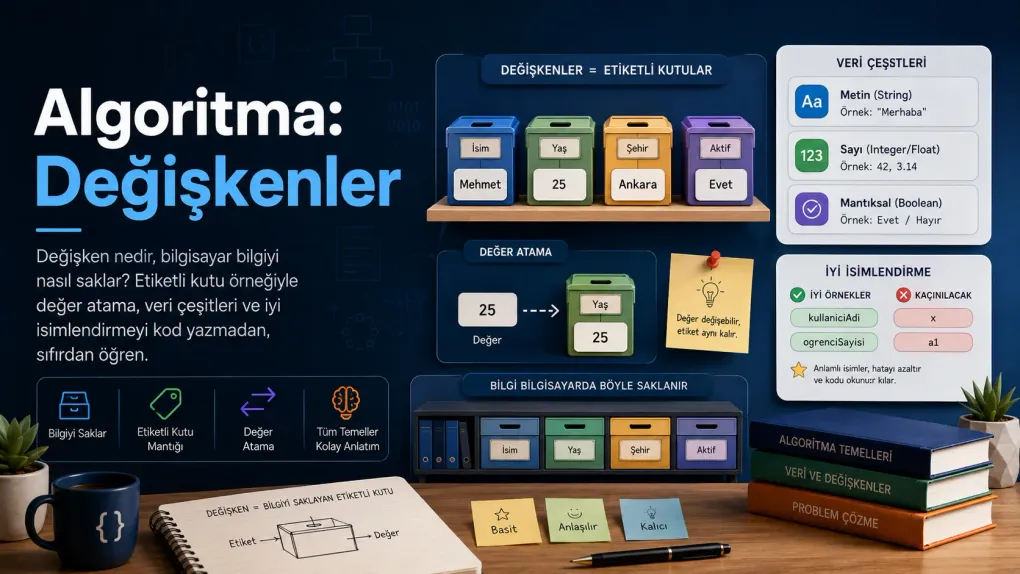
Series · Algorithms
In the previous post, while writing pseudocode, we used lines like n ← 1 or total ← 0. But we never stopped to ask: what exactly is this n, this total? These little boxes we put values into have a name: variables.
In this post, without writing any code, we’ll understand what a variable is from the very beginning, with everyday examples. Because a variable is how a program remembers information — and it sits at the heart of nearly every algorithm you’ll write.
A memory problem
Think of it like this: you send a friend shopping and tell them over the phone. “Buy three loaves of bread,” you said. Your friend has to keep that in mind, right? They make a mental note: “bread = 3”.
A computer does the same. To use a piece of information later, it has to put it somewhere and give that place a name. That place is the variable.
A variable is a box we put a piece of information into, with a name (a label) on it. When you say the box’s name, the computer brings you the value inside.
The labeled box
Keep this picture in mind: a box with a label on it.
- The box’s name (label):
age - The value inside:
25
You can draw it on paper like this:
┌───────────┐│ age │ ← the box's name (label)│ 25 │ ← the value inside└───────────┘Now when you say age, the computer understands “25”. Once you’ve set the name, you don’t have to memorise the value; you just use the name.
Describing a person with boxes
A single box is nice, but the real power appears when you use several together. Say we want to describe a user. One piece of information isn’t enough; we use several boxes:
name ← "Mehmet"age ← 25city ← "Ankara"active ← trueThat’s it: four boxes describing one person. We represent a game character (health, score, level), a product (name, price, inStock) or an account the same way — several variables used together. Each box holds one piece; together they form the whole.
Putting something in the box: assignment
Putting a value into a variable is called assignment. In pseudocode we showed it with a left arrow (←):
age ← 25 # put 25 into the "age" boxname ← "Ada" # write Ada into the "name" boxbread ← 3 # put 3 into the "bread" boxDon’t read these left to right as “this into that”, read them right to left: first the value 25 is prepared, then it is put into the age box.
You can also put one variable’s value into another. In that case the value is copied — the source box stays as it is:
a ← 7 # box a holds 7b ← a # a's value (7) is COPIED into ba ← 99 # a changed but b is still 7; b got a copy of the valueThe life of a variable
Every variable lives a short life with three stages:
- Birth (creation): You first give a name and put a value inside —
score ← 0. - Use (reading): You say the name and read the value inside —
PRINT score. - Change (update): You write a new value over it —
score ← score + 10.
Trying to read a variable before it is born (before putting any value inside) is a typical mistake — like trying to take something out of an empty box. Put first, then read.
Doing operations with variables
Variables don’t just store information; their real power is that you can do operations on them. You do arithmetic with numbers:
width ← 5height ← 3area ← width * height # area = 15+ add, - subtract, * multiply, / divide. Remember from last time: MOD gives the remainder of a division (7 MOD 3 = 1). You can combine several variables in one formula — for example, let’s convert Celsius to Fahrenheit:
celsius ← 25fahrenheit ← celsius * 9 / 5 + 32 # 77You can join texts together (this is called concatenation); usually + is used again:
first ← "Ada"last ← "Lovelace"full ← first + " " + last # full = "Ada Lovelace"Note: without the " " (a quoted space) in the middle, the result would be "AdaLovelace". The computer does exactly what you say — you even have to put the space yourself.
Why “variable”? Because its value varies
That’s exactly where the name comes from: a variable’s value can change. If you put a new value into the same box, the old value is lost:
score ← 10 # the score box now holds 10score ← 25 # the old 10 is erased; score now holds 25score ← score + 5 # score = 25 + 5 = 30Look at the last line: score ← score + 5. This is not maths! It means “take the current score, add 5, and put the result back into the score box”. So the box is read first, then a new value is written over it. This is exactly how you increase a counter.
An old friend: swap
In the first post we solved the “swap the contents of two glasses” puzzle, remember? Now we see why that puzzle was so important: if you write over a box without thinking, the old value is lost.
That’s why swapping two variables’ values needs a temporary box:
temp ← a # save a's value in the temp boxa ← b # put b's value into ab ← temp # put the saved value into bThat “empty third glass” in the puzzle was exactly this temp variable.
Following variables: the trace table
Because variables keep changing in an algorithm, the question “what’s in which box right now?” gets harder to follow. Programmers use a simple but powerful tool for this: the trace table. Each row is a step, each column a variable; you “run” the algorithm on paper, in your head.
Let’s trace this little algorithm:
counter ← 0counter ← counter + 1counter ← counter + 1counter ← counter * 2After each line, we write the value of counter into a table:
| Step | counter |
|---|---|
counter ← 0 | 0 |
counter ← counter + 1 | 1 |
counter ← counter + 1 | 2 |
counter ← counter * 2 | 4 |
At the end of the table we know for certain that counter is 4 — we didn’t guess, we traced it step by step. When you have a bug, this method is gold: you see exactly which step went wrong.
Computers’ basic types: primitive types
What you put in a box matters, because a computer stores different kinds of information differently and does different things with them. The most basic types, ones that can’t be broken into smaller pieces, are called primitive types — like the bricks every program is built from. Don’t let them look scary; they’re all things you already know from everyday life.
Integer — things you count
Things that aren’t split, counted one by one: the apples in a basket, your age, the number of floors in a building, the students in a class. There’s no such thing as “2.5 students”.
age ← 25 quantity ← 3 floor ← 7Link to algorithms: A counter in a loop is always an integer (count from 1 to 5); it holds how many of something there are.
Float — things you measure
Things that can be fractional, obtained by measuring: your height (1.78 m), your fever (36.6°C), a product’s price (9.99), the fuel in a tank (42.5 litres).
height ← 1.78 price ← 9.99 temperature ← 36.6Link to algorithms: Averages, ratios, percentages and money calculations are usually done with floats (average ← total / 3).
Character (char) — a single symbol
A single letter, digit or sign; written in single quotes: 'A'. Everyday counterparts: your blood type (A, B, 0), your grade (A, F), a Y/N answer to a question.
bloodType ← 'A' grade ← 'B' answer ← 'Y'Link to algorithms: Used for “single-key choices” (a Y/N menu) or checking a single letter.
True / False (boolean) — two-state things
Information with only two values: is the light on or off, is the door locked, is the bill paid, is it raining. Like an on/off switch.
doorOpen ← true paid ← falseYou usually don’t write this type yourself — it appears on its own as the result of a comparison:
age ← 20adult ← age ≥ 18 # the adult box gets "true" (because 20 ≥ 18)Link to algorithms: This is the fuel of all conditions (IF … THEN); the comparison operators from last time (≥, <, = …) always produce these true/false values. It’s also used as a “flag” that marks a state.
And: text (string) — a sequence of characters
A name, an address, a sentence… A string is actually made of characters placed side by side: "Ada" = 'A' + 'd' + 'a'. Written in double quotes.
name ← "Ada" city ← "İstanbul"Link to algorithms: Used to store a user’s name, a message or an address.
Let’s see them all together:
| Type | Everyday counterpart | Example | In algorithms |
|---|---|---|---|
| Integer | apple count, age | 25 | counter, quantity |
| Float | height, temperature, price | 9.99 | average, ratio |
| Character (char) | blood type, grade | 'A' | menu choice |
| Boolean | is the light on? | true | conditions, flag |
| String | name, address | "Ada" | user input |
The unchanging ones: constants
Sometimes we want a value to never change. A circle’s pi is always 3.14159; a VAT rate stays constant throughout a calculation. Boxes we set once and never change are called constants:
PI ← 3.14159VAT_RATE ← 0.20It’s a convention to write constants in CAPITAL letters, so anyone looking at the code immediately knows “don’t touch this, it doesn’t change”. Making a value that shouldn’t change into a constant stops you from breaking it by accident.
All together: a small example
Let’s combine what we’ve learned one by one. We’ll calculate the VAT-inclusive total of a shopping cart. Here assignment, operations, numbers and a constant all work together:
VAT_RATE ← 0.20
price    ← 50quantity ← 3subtotal ← price * quantity      # 150vat      ← subtotal * VAT_RATE   # 30total    ← subtotal + vat         # 180
PRINT "Amount due: " + total
Read it line by line: subtotal is computed from price and quantity, vat from the subtotal and the constant rate, total from the sum of the two. Each variable builds on the previous one — just like the steps in a recipe. That’s how variables work together in an algorithm.
A good variable deserves a good name
You can give a variable any name you like, but a good name tells you at a glance what’s inside the box.
# Bad # Goodx ← 25 age ← 25a ← "Ada" name ← "Ada"t ← f * m total ← price * quantityWhen you read the lines on the right you understand what they do; on the left you have to guess. A few practical rules:
- Be meaningful — the name should describe the value (
temperature,userName). - No spaces — most languages don’t accept them. Join the words:
userName(this is called camelCase) oruser_name(this is called snake_case). - Don’t start with a digit — not
2player, butplayer2. - Be consistent — use camelCase everywhere or snake_case everywhere in a project, don’t mix them.
Remember: the person reading your code six months later is usually you — and you’ll want to thank yourself then.
Common mistakes
Try it yourself
Grab a sheet of paper and a pen, and use the trace table habit we just learned: after each line, write what’s inside each box into a table.
Exercise 1 — Follow along (easy)
apple ← 4pear ← 7apple ← apple + 2temp ← appleapple ← pearpear ← tempExercise 2 — Compute the average (medium)
A student has three exam scores: 70, 85 and 90. Write the pseudocode that finds the average of these scores.
Exercise 3 — Describe yourself (mini project)
Write the variables that represent you:
name,age,city,student(true/false). Then increase yourageby one (imagine you’ve had a birthday) and change yourcity.
Summary
Related posts
Frequently asked questions
What is a variable?
A variable is a box that holds a piece of information and has a name (a label) on it. You put a value inside it (for example age = 25) and then reach the value using that name. It is the most basic way a computer remembers something, and physically it is stored in the computer's memory (RAM).
What does assigning a value to a variable mean?
Assignment means putting a value into a variable. In pseudocode it is usually shown with a left arrow (age ← 25) or an equals sign (age = 25). It reads "put 25 into the age box"; here the equals sign is not the maths "is it equal?" question, but a "put this inside" command.
Can a variable's value change?
Yes — that is exactly where the name comes from. When you write a new value over a variable, the old value is lost and the new one takes its place. This is why a temporary variable is often used to move a value somewhere without losing it.
What are the kinds of variables (data types)?
For a start, three basic kinds are enough: numbers (integer 25, float 9.99), text/strings ("Ada", in quotes) and true/false values (true, false). Different kinds of information are kept in different boxes; in later languages these are called "data types".
What is a primitive data type?
Primitive types are the most basic data types that cannot be broken into smaller pieces: integer, float, character (char) and true/false (boolean). Their everyday counterparts are, respectively, things you count (apples), things you measure (height), a single symbol (blood type) and two-state things (light on/off). Text (string) is usually not counted as primitive, because it is made of characters.
What is a trace table?
A trace table is a table used to follow how each variable's value changes while you run an algorithm step by step on paper. Each row is a step and each column is a variable. It is the most practical way to find mistakes before writing any code.
What is the difference between a constant and a variable?
A variable's value can change while the program runs; a constant's value is set once and never changes (for example Pi = 3.14159 or VAT_RATE = 0.20). Making values that should not change into constants prevents them from being altered by accident.
What makes a good variable name?
A good name tells you at a glance what is inside the box. Instead of "x", choose meaningful names like "age", "total", "userName". Spaces are usually not allowed; words are joined with camelCase (userName) or snake_case (user_name).