Algorithms: Pseudocode
What is pseudocode and how do you write it? The bridge from flowchart to code: assignment, conditionals, loops, comparison and logic operators.
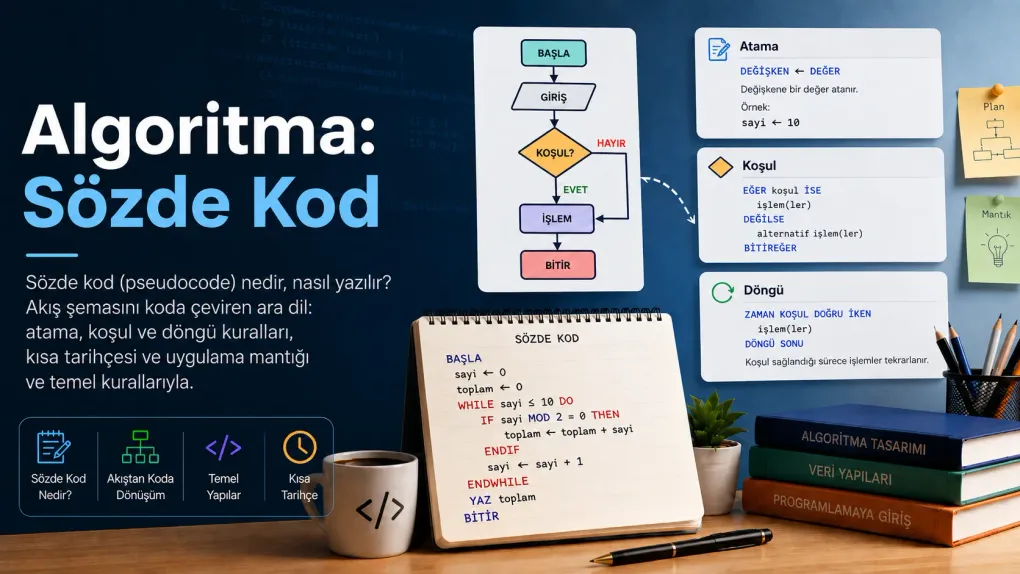
Series · Algorithms
In the first post we described an algorithm in words, in the second we drew it with boxes and arrows. Now one step remains: putting the same logic into a written form that can be translated almost line-for-line into real code. That form is called pseudocode.
A flowchart is great for seeing an idea; but drawing a long algorithm box by box gets tiring. This is exactly where pseudocode fits: it keeps the clarity of the diagram, but it is much faster to write and to turn into code later.
Pseudocode is a way of writing an algorithm without being bound by the strict rules of any programming language — close to human language but with a clear structure. “Pseudo” (meaning “as if”) because it resembles code but cannot be run; its purpose is for a human to read and to clarify the idea.
What is pseudocode?
The name sounds technical, but the idea is plain. Take the same task — “count from 1 to 5” — expressed three ways:
- Plain sentence: “Start at 1, print and add one each time until you pass 5.”
- Flowchart: boxes, a decision and an arrow that loops back.
- Pseudocode: as below, line by line and indented.
n ← 1WHILE n ≤ 5 DO PRINT n n ← n + 1ENDWHILEAll three are the same algorithm. Pseudocode reads almost like the plain sentence but is as structured as real code — it sits right in the middle of the two.
First, a short history
Since this series explains the algorithm from the very beginning, it helps to know where the words come from. Because this story also explains why pseudocode exists.
So where did pseudocode come from? For centuries algorithms were written in plain prose (like a recipe). But when computers arrived in the mid-20th century, a problem appeared: plain language was too vague, while real code was too rigid and machine-specific. In between, there was a need for a form a human could easily read and reason about.
In the 1950s–60s the structured programming movement and the ALGOL language (its name literally comes from ALGOrithmic Language) opened the way to expressing algorithms cleanly, in blocks. Donald Knuth’s famous The Art of Computer Programming also described algorithms in an English-like, step-by-step style. The pseudocode we use today is the simplified descendant of this tradition.
What is pseudocode good for?
If it looks like code, why not write code directly? Because pseudocode solves a few real problems:
- You focus on the logic. Semicolons, brackets, variable types and other language details don’t distract you; you deal only with “what should happen”.
- It is language-independent. Anyone can read and apply the same pseudocode, whatever language they use. It is a common team language.
- You catch mistakes early. You notice a missing step or a wrong condition on paper, before writing any code.
- It is easy to translate. Well-written pseudocode maps almost line-for-line to real code.
The “grammar” of pseudocode
The most important thing to know here:
1) Assignment — putting a value into a box
Giving a value to a variable; usually a left arrow (←):
age ← 18name ← "Ada"total ← a + b2) Input / Output — taking data in and giving a result out
READ (input) and PRINT (output):
READ userNamePRINT "Hello, " + userName3) Conditional — branching on a decision
IF … THEN, optionally ELSE, and ENDIF to close the block:
IF score ≥ 50 THEN PRINT "Pass"ELSE PRINT "Fail"ENDIF4) Loop — repeating
A block that runs while a condition is true: WHILE … DO … ENDWHILE:
money ← 100WHILE money > 0 DO money ← money - 10ENDWHILE5) Comparison operators
They compare two values; the result is “true” or “false”. You use them inside conditions:
| Pseudocode | Reads as | Example |
|---|---|---|
= | equal to | age = 18 |
≠ | not equal to | answer ≠ "yes" |
> | greater than | score > 90 |
< | less than | stock < 5 |
≥ | greater than or equal | age ≥ 18 |
≤ | less than or equal | n ≤ 10 |
6) Logical operators
They combine several conditions, or invert one:
| Pseudocode | Meaning | Example |
|---|---|---|
AND | true if both conditions are true | age ≥ 18 AND citizen |
OR | true if at least one is true | saturday OR sunday |
NOT | inverts a condition | NOT loggedIn |
For example, a voting rule fits on a single line:
IF age ≥ 18 AND citizen THEN PRINT "Can vote"ENDIF7) Indentation — shows what is inside what
You indent the lines inside an IF or a loop. This is the written counterpart of the “path inside the box” in a flowchart. Closers like ENDIF and ENDWHILE also make it clear exactly where a block ends.
Translating a flowchart into pseudocode
The nice part: you can turn the diagrams from the second post into pseudocode almost mechanically. Let’s recall the same three examples.
Even or odd? (decision)
The decision diamond in the diagram becomes an IF in pseudocode:
READ nIF n MOD 2 = 0 THEN PRINT "Even"ELSE PRINT "Odd"ENDIF
MODgives the remainder of a division (5 MOD 2 = 1). If the remainder is 0, the number divides exactly, i.e. it is even.
Count from 1 to 5 (loop)
The arrow that loops back in the diagram turns into a loop block:
n ← 1WHILE n ≤ 5 DO PRINT n n ← n + 1ENDWHILEPassword with 3 attempts (nested structure)
Even the most complex example looks simple. A loop, a decision inside it, and a counter:
attempts ← 0WHILE attempts < 3 DO READ password IF password is correct THEN PRINT "Access granted" STOP ELSE attempts ← attempts + 1 ENDIFENDWHILEIF attempts = 3 THEN PRINT "Account locked"ENDIFAs you can see, every shape in the diagram maps to a line or a block in pseudocode. A flowchart and pseudocode are two faces of the same algorithm.
Putting it all together: a full example
Now let’s combine everything we’ve learned into one algorithm. The problem: find the sum of the even numbers from 1 to 10. Here assignment, loop, conditional, comparison and MOD all work together:
START n ← 0 total ← 0 WHILE n ≤ 10 DO IF n MOD 2 = 0 THEN total ← total + n ENDIF n ← n + 1 ENDWHILE PRINT totalENDRead it line by line: n goes from 0 to 10; on each round it asks “is it even?” (n MOD 2 = 0), and if so adds it to total. When the loop ends, the result is printed. A task that looks complex was solved by nesting five simple building blocks. This is what the whole series has been about: break the problem into steps, write the steps in clear words.
Common mistakes
Try it yourself
Don’t just read on — grab a sheet of paper and a pen. Write the pseudocode for the problems below (you can also draw the flowchart; both lead to the same place).
Exercise 1 — Greeting (easy)
Take the user’s name and print “Hello, <name>!” to the screen.
Exercise 2 — Pass or fail (medium)
Take a student’s score. If it is above 85 print “Pass (excellent)”, if it is 50 or above print “Pass”, otherwise print “Fail”.
Exercise 3 — Voting right (logical operator)
A person can vote if they are older than 18 AND a citizen; print “Can vote”, otherwise “Cannot vote”.
Read your pseudocode aloud to your “robot friend”: Is every step clear? Are the indentation and block closers right? Does the loop end somewhere? If you can do that, you’re ready to translate it into code.
Summary
Related posts
Frequently asked questions
What is pseudocode?
Pseudocode is a way of writing an algorithm in a structured but human-readable form, without being bound by the strict rules of any programming language. It is the stop between a flowchart and real code: it clarifies the idea and then translates almost line-for-line into actual code.
Does pseudocode have a fixed standard or syntax?
No. There is no single, universally agreed standard for pseudocode. What matters is being consistent and readable: pick a few conventions that clearly show assignment, conditionals and loops, and use them the same way from start to finish.
Which logic and comparison words does pseudocode use?
For comparison: = (equal), ≠ (not equal), > (greater), < (less), ≥ (greater or equal) and ≤ (less or equal). To combine conditions there are logical operators: AND (both conditions true), OR (at least one true) and NOT (inverts a condition).
Where does the word "algorithm" come from?
It comes from the Latinised name "Algoritmi" of the 9th-century Persian mathematician Muhammad ibn Musa al-Khwārizmī, who worked at the House of Wisdom in Baghdad. The same scholar’s work "al-jabr" is also the root of the word "algebra".
Why use pseudocode?
Because it lets you focus on the logic of the solution before the syntax of a language (semicolons, brackets, types…). You shape the idea quickly, share it with teammates regardless of language, and catch mistakes before writing any code.