Algorithms: Loops
What is a loop and how does a computer repeat the same work? Learn counter and conditional loops, a loop's three parts and the infinite-loop trap — no code.
Series · Algorithms
In the previous post we learned conditionals: looking at a true/false question and choosing a path. But did you notice that IF asked its question only once — it entered a branch based on the answer and moved on. What if we want to do the same work not once but dozens of times? To ask the same decision over and over?
That is exactly what this post is about: running a group of steps again and again while a condition holds. We call it a loop. So far our program either flowed straight down or made a single choice and moved on; with a loop it can, for the first time, go back and repeat the same work. And we’ll see that a loop is nothing but the decision from the previous post, asked over and over.
Why do we need loops?
Say you want to print the numbers 1 to 5. We have the PRINT command from the pseudocode post — it writes to the screen. You could do this:
PRINT 1PRINT 2PRINT 3PRINT 4PRINT 5Five lines, no big deal. But what about 1 to 1000? Are you going to write a thousand lines? And what if the limit isn’t known up front — like “count until the user enters 0”? Then you can’t even know how many lines to write. That’s where we get stuck.
Yet the work here is really the repetition of a single pattern: “print a number, then add one to it, and keep going until you hit the limit.” You do exactly this all day long:
- Climbing stairs, you repeat the same move on each step — until you reach the top.
- Washing dishes, you repeat the same steps for each plate — until the sink is empty.
- On a running track, you run the same lap each time — until you hit your target lap count.
This is precisely what a computer does best: repeating the same work tirelessly, without ever slipping. A loop is how you tell it to “repeat this until that condition breaks.” Set it up correctly once, and whether it runs five times or five million times is all the same to it.
The three parts of a loop
Every loop is built from the same skeleton: you set up a counter, ask a condition, do your work, update the counter, and go back to the condition. We’ve actually met this skeleton before: in the flowcharts post we briefly called these “the three must-haves of a loop” without unpacking them. Let’s now open up those three parts one by one — because if any of them is missing, the loop either never runs or never stops:
- Initialization — Before entering the loop you lay the groundwork: you set up a counter or variable. “Start counting from 1.” (
count ← 1— that arrow is the assignment you know from the variables post: put 1 into the count box.) - Condition — A question asked at the start of each pass: should we keep looping? If true, one more pass runs; the moment it’s false, the loop ends. “Is count still less than or equal to 5?” (
count ≤ 5) - Progression — The step inside the loop that will eventually break the condition. Without it, the condition stays true forever. “Add one to count each pass.” (
count ← count + 1)
Keep this trio in mind; the rest of this post revolves around these three parts. When you look at a loop, reflexively ask: Where does it start? When does it stop? Where is the step that stops it?
Counter loop: “do this exactly N times”
The most familiar loop is the one where you know up front how many times it runs. A counter tracks the passes, and you say “loop until you reach this number.” In the flowcharts post we called this a counter loop.
In pseudocode we open a loop with WHILE … DO and close it with ENDWHILE — just as we met in the pseudocode post. Here’s the loop that counts from 1 to 5 — the very example we drew as a flowchart and wrote as pseudocode in the earlier posts — all three parts in place:
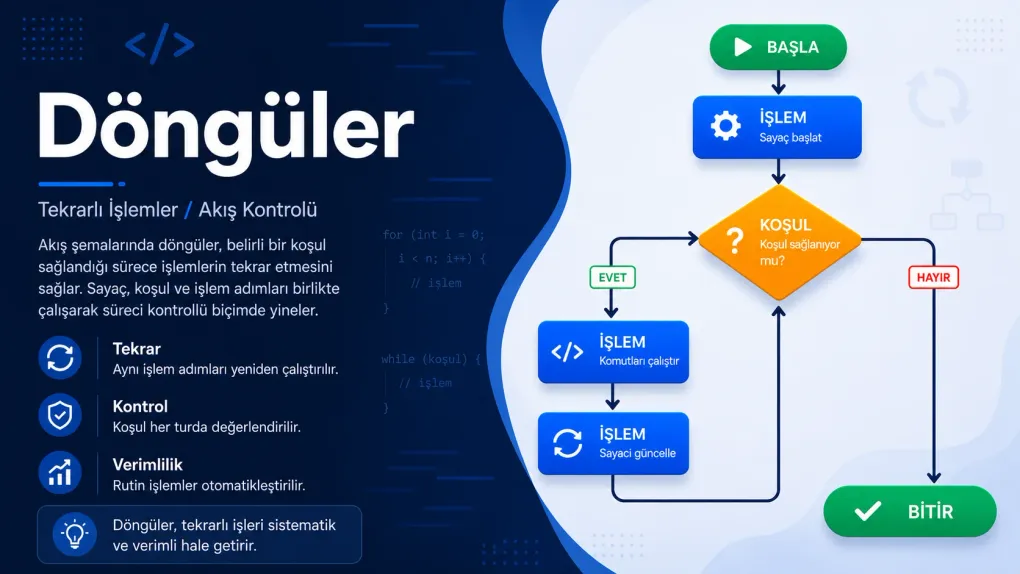
count ← 1WHILE count ≤ 5 DO PRINT count count ← count + 1ENDWHILERead it line by line: we start count at 1 (initialization). Then we ask “is count ≤ 5?” (condition); if true we go inside, print the number, and add one (progression). At ENDWHILE the arrow goes back to the condition and the question is asked again. This continues until count becomes 6 and the condition says “false.” Let’s also see the same idea as a flowchart:
flowchart TD
    A([Start]) --> B[count ← 1]
    B --> C{count ≤ 5?}
    C -- Yes --> D[PRINT count]
    D --> E[count ← count + 1]
    E --> C
    C -- No --> F([End])
That loop-back arrow (from E to C) is the heart of the loop; spotting it is the fastest way to say “there’s a repetition here.” Now let’s run this loop by hand on paper — writing down what the variables are on each pass is the best way to understand a loop:
| Pass | count (start) | count ≤ 5 true? | Printed | count (end) |
|---|---|---|---|---|
| 1 | 1 | true | 1 | 2 |
| 2 | 2 | true | 2 | 3 |
| 3 | 3 | true | 3 | 4 |
| 4 | 4 | true | 4 | 5 |
| 5 | 5 | true | 5 | 6 |
| 6 | 6 | false | — | (loop ends) |
On the sixth pass count becomes 6, the condition comes out false, and the loop stops gracefully. We call this a trace table; it’s familiar from the variables and conditionals posts. Whenever you’re unsure about a loop, walk it on paper like this for a few passes — you’ll see it with your own eyes.
Conditional loop: “do this until something happens”
We don’t always know how many times we’ll loop. Sometimes we loop until something happens — the number of passes isn’t known up front; it depends on an external event. This is called a conditional loop. Here there’s no counter tracking passes; what stops the loop is something changing in the world.
You have 100 in your pocket and spend 20 each day. How many days will your money last? You don’t need to work out the number of passes in advance — the loop runs on its own until the money runs out:
money ← 100days ← 0WHILE money ≥ 20 DO money ← money - 20 days ← days + 1ENDWHILEPRINT daysNotice: the structure is still the same three parts (initialization, condition, progression), but this time “progression” isn’t incrementing a counter — it’s reducing the money. The condition (money ≥ 20) isn’t counting passes, it’s watching a state. The loop stops when the money drops below 20. Here’s the flowchart:
flowchart TD
    A([Start]) --> B[money ← 100, days ← 0]
    B --> C{money ≥ 20?}
    C -- Yes --> D[money ← money - 20]
    D --> E[days ← days + 1]
    E --> C
    C -- No --> F([End: print days])
Now notice the real subtlety here:
We’ve actually been living with this kind of loop since day one of the series. The “wait until the water boils” step in the tea-brewing algorithm from the first post was a conditional loop: how many minutes it takes isn’t known; it ends when the water boils. So is the door we drew in the flowcharts post that keeps asking until the correct password is typed: “keep asking until the password is correct.” How many attempts it takes isn’t known up front; the moment the user gives the right answer, the loop ends on its own.
Counter or conditional? How do I choose?
One question keeps them straight: “Do I know up front how many times it will loop?”
| Question | Counter loop | Conditional loop |
|---|---|---|
| How many times? | Known up front (“exactly 10”) | Unknown up front (“until it happens”) |
| What does it watch? | A counter (count ≤ 10) | A state (money ≥ 20, wrong password) |
| Everyday example | ”run 5 laps" | "run until you’re tired” |
| Name in real code | usually for | usually while |
Neither name in the table should scare you; both are old friends. The while of real code is the very WHILE … DO we’ve been writing since the pseudocode post, and you met for a moment ago as the shortcut that packs the three parts into one line.
Both can be written with the same WHILE … ENDWHILE structure; the difference is what stops the loop. If you’re unsure, ask yourself: “does my stopping rule depend on a number, or on something happening out in the world?”
Accumulating with a loop: sum and count
One of the most powerful things about loops is accumulating a small contribution each pass and arriving at a single result at the end. You’ve actually seen this pattern before: at the end of the pseudocode post we found the sum of the even numbers from 1 to 10, and the total variable there grew exactly like this, pass by pass. Let’s build a simpler version of that example: the sum of all the numbers from 1 to 10. To do it, we place a second variable next to our loop variable (n) to accumulate the result:
n ← 1total ← 0WHILE n ≤ 10 DO total ← total + n n ← n + 1ENDWHILEPRINT totalThere are two variables here, and their roles are completely different:
nis the loop variable (the counter) that drives the passes. It grows 1, 2, 3… and moves the loop forward.totalis the accumulator that gathers the result. It grows byneach pass: 0 → 1 → 3 → 6 → 10… When the loop ends, the final answer (55) sits inside it.
You can count with the same idea: if you bump an accumulator (itemCount ← 0) by one on each qualifying pass, you’ll know how many there were when the loop ends. Summing, counting, finding the largest… they’re all variations of this “prepare before the loop, update each pass” pattern.
The infinite loop: the most classic trap
What happens if you forget the progression among a loop’s three parts? The condition never breaks, the loop never stops. This is called an infinite loop — we met it by name in the pitfalls section of the flowcharts post — and it’s the number-one nemesis of beginners. Now let’s catch it in the act.
Look — let’s delete a single line from our first example:
count ← 1WHILE count ≤ 5 DO PRINT countENDWHILEThe count ← count + 1 line is gone. Now trace it on paper: count is always 1. “Is 1 ≤ 5?” — yes. Print 1. Ask again: “Is 1 ≤ 5?” — yes again. Print 1. Again, again, again… because count never changes, the condition stays true forever; the program keeps printing “1” endlessly and never finishes.
A note: sometimes an infinite loop is set up on purpose — a program that keeps a website up day and night must never stop, for instance. But even then there’s a special exit inside to break the loop when needed. The STOP command you saw in the three-attempt password example of the pseudocode post did exactly this job: when the correct password came in, it cut the loop right in the middle. As a beginner, our rule is clear: every loop must have an ending.
Nested loops: a loop inside a loop
Nested structures are nothing new to you: we put a conditional inside a conditional, and in the flowcharts post we placed a decision inside a loop to print the even numbers from 1 to 10. Now we go one step further: we’ll put another loop inside a loop. This is called a nested loop. Let’s print a small multiplication table: for each row from 1 to 3, print that row’s products from 1 to 3.
row ← 1WHILE row ≤ 3 DO col ← 1 WHILE col ≤ 3 DO PRINT row × col col ← col + 1 ENDWHILE row ← row + 1ENDWHILEHow does it work? The outer loop (row) takes one pass, and within that single pass the inner loop (col) runs fully from start to finish. So while row = 1, cols 1, 2, 3 are printed; then row becomes 2 and cols 1, 2, 3 are printed again… If the outer loop runs 3 times, each time running the inner loop 3 times, that’s 3 × 3 = 9 passes in total. Notice the indentation shifting one level deeper; which loop owns what is shown, again, by indentation.
Common mistakes
Try it yourself
Pen and paper are all you need. For each exercise, first write the pseudocode (don’t forget the three parts: initialization, condition, progression), then draw a trace table and walk the loop by hand for a few passes.
Exercise 1 — Countdown (easy)
Print the numbers from 10 down to 1, largest to smallest (10, 9, 8, … 1).
Exercise 2 — Multiples of a number (medium)
Take a number from the user (say 7) and print its multiples from 1 to 10: 7, 14, 21, … 70. Then, at the very end, print their sum.
Exercise 3 — Multiplying bacteria (mini project)
A dish holds 1 bacterium, and every hour the count doubles (1 → 2 → 4 → 8 …). How many hours does it take for the count to exceed 1000?
Summary
Related posts
Frequently asked questions
What is a loop?
A loop runs a group of steps over and over while a condition holds. Instead of writing the same work by hand dozens of times, you say "repeat this until that condition breaks." This is what the loop-back arrow in a flowchart and the WHILE … ENDWHILE block in pseudocode do; it is the only way an algorithm can handle repetition.
What is the difference between a counter loop and a conditional loop?
A counter loop says "do this exactly N times": you know up front how many times it runs and a counter tracks the passes (printing 1 to 10). A conditional loop says "do this until something happens": the number of passes is unknown and it stops when an external condition breaks (asking until the correct password is typed). In real code the first is usually a for loop, the second a while loop.
What are the three parts of a loop?
Every healthy loop has three things: (1) initialization — setting up the counter or variable (count ← 1); (2) condition — the question checked at the start of each pass to decide whether to keep going (count ≤ 10); (3) progression — the step that eventually breaks the condition (count ← count + 1). If any of the three is missing, the loop either never runs or never stops.
What is an infinite loop and how do you avoid it?
It is a loop whose exit condition is never met, so it never ends. The most common cause is forgetting the step inside the loop that changes the counter or condition; since the condition stays true forever, the program loops endlessly. To avoid it, make sure there is a step that eventually breaks the condition you check, and trace the loop by hand for a few passes on paper.
What is a nested loop?
It is putting one loop inside the body of another. Each time the outer loop takes one pass, the inner loop runs fully from start to finish, so the total number of passes is the product of the two. It is used for two-dimensional work like rows and columns, a multiplication table, or walking a grid. You must remember to reset the inner loop's counter on every outer pass.
How do you accumulate a sum or count with a loop?
You set up an accumulator variable before the loop (total ← 0), then add to it on each pass (total ← total + n). The loop variable that drives the counter and the accumulator that holds the growing result are separate; it is important not to mix them up. When the loop ends, the final result sits in the accumulator.
What is the relationship between a loop and a conditional?
A loop is really a condition asked at the start of every pass: "is the condition still true? Then take one more pass." So a loop is the IF decision from the previous post, asked over and over. That is why loops are hard to fully grasp without conditionals (comparisons and AND/OR/NOT logic); a loop sits on top of a decision.